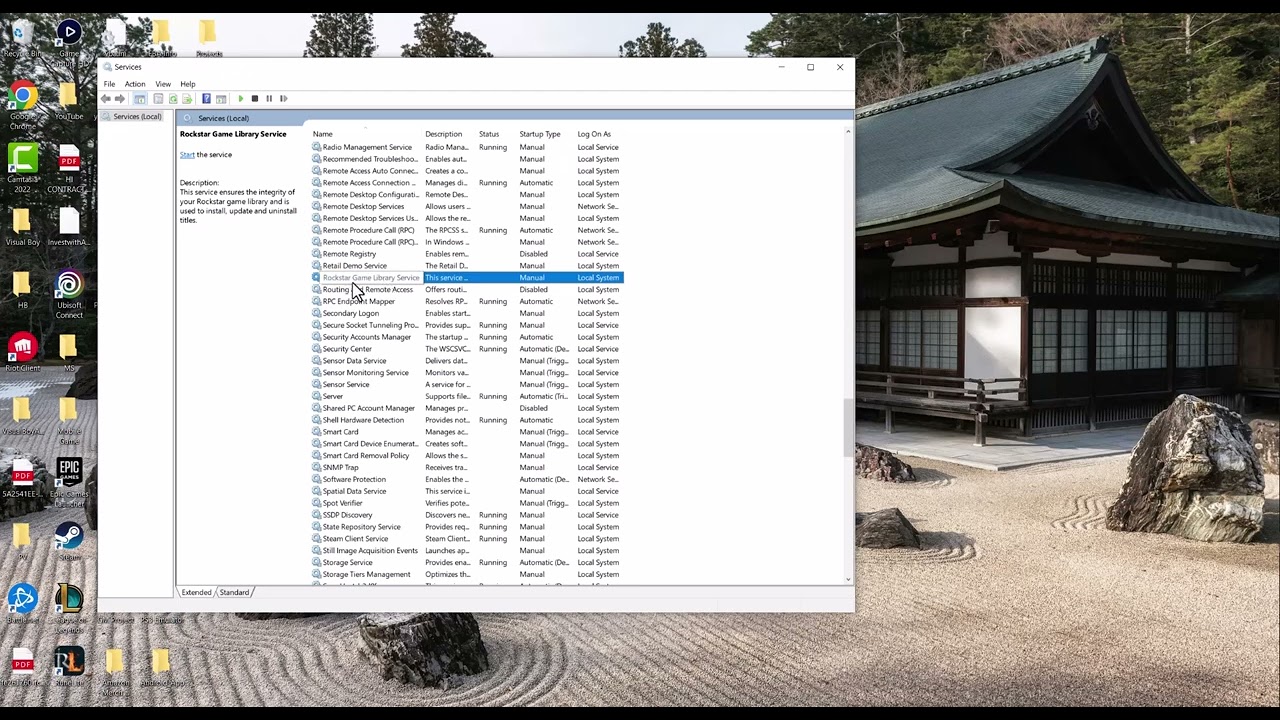
Quick answer: Update Windows, run the current Rockstar Games Launcher installer as a repair, and set Rockstar Games Library Service to Automatic in Windows Services. Keep antivirus protection on; add a narrow launcher-folder exception only if security software is blocking the service.
Before you start
- Close GTA 5 and the Rockstar Games Launcher.
- Confirm Rockstar’s service-status page does not show an outage.
- Use a Windows administrator account for the service and installer steps.
Fix the Games Library Service error
- Update Windows: Open Settings > Windows Update, install available updates, and restart.
- Repair launcher components: Download the current installer from Rockstar’s official launcher page and run it. The installer checks existing components and the Library Service.
- Set the service to Automatic: Search for Task Manager, choose Run as administrator, open Services, right-click Rockstar Service, and choose Open Services. Double-click Rockstar Games Library Service, set Startup type to Automatic, select Apply, then Start if the service is stopped.
- Restart the launcher: Close Services and start Rockstar Games Launcher normally.
- Check security software: If the service stops again, allow the exact folder
C:Program FilesRockstar GamesLauncherthrough your security software. Do not exclude a whole drive.
Why this works
The launcher depends on a Windows service to discover and manage installed Rockstar games. Rockstar says this error can appear when Windows is outdated, a launcher component is misconfigured, or the Library Service is paused or stopped. Automatic startup ensures the service is available before the launcher requests it.
Alternatives
- Verify Rockstar Games Launcher is operational on the official status page.
- If the service entry is missing, reinstall the launcher using the official installer.
- If Windows security repeatedly blocks the service, remove any broad exclusions and create only the exact launcher-folder exception recommended by Rockstar.
Warnings and reversal
Do not permanently disable antivirus or firewall protection. If the folder exception makes no difference, remove it from Windows Security > Virus & threat protection > Manage settings > Exclusions. Changing the service from Manual to Automatic is reversible from the same Services window.
FAQ
Should I reinstall GTA 5?
Not first. This message points to the launcher service, so repair the launcher and service before downloading the entire game again.
What if the Start button is unavailable?
Run Services as an administrator. If the service is missing, reinstall the current launcher from Rockstar.
Is the workaround official?
The source video highlights the service setting, and the actionable path is independently confirmed by Rockstar Support.
Official references
- Rockstar: Failed to connect to the Rockstar Games Library Service
- Rockstar Games Service Status
- Official Rockstar Games Launcher download
Source video
The transcript remained unavailable after all retries. The video’s visible title and chapter labels identify the service-settings method; the steps above use Rockstar’s current first-party instructions rather than inferred narration.
As an Amazon Associate I earn from qualifying purchases.