Quick answer: When Black Ops reports that the server is not available on PS5, check the Call of Duty and PlayStation service status first. If both are online, restart the game, PS5, and router; test Ethernet; then force the PS5 to use the more stable 5 GHz or 2.4 GHz Wi-Fi band. Try a trusted DNS resolver only after those checks.
Before you start
- Check Activision Online Services and PlayStation Network status.
- Confirm the PS5 can open another online game or the PlayStation Store.
- Finish any game or system update before changing network settings.
- These steps address a connection problem. They cannot restore a retired game service or a title unavailable through your current platform or subscription.
How to fix “Server Not Available” on PS5
- Retry after checking live status. If Activision or PSN reports an incident, wait for recovery. Repeated restarts will not repair a server-side outage.
- Close the game fully. Highlight the running game on the PS5 home screen, press the Options button, and choose Close Game. Reopen it once.
- Restart the PS5. Use Power > Restart PS5, not Rest Mode. A full restart refreshes the console’s network session and game process.
- Power-cycle the router. Disconnect the router from power for about 30 seconds, reconnect it, and wait until internet service is stable before turning the PS5 connection back on.
- Test the connection. Open Settings > Network > Connection Status > Test Internet Connection. If the console has no internet or cannot sign into PSN, solve that broader issue first.
- Test Ethernet. Connect the PS5 to the router with a network cable, then go to Settings > Network > Settings > Set Up Internet Connection and select the wired network. Activision strongly recommends a wired connection for online play.
- Choose a fixed Wi-Fi band. If Ethernet is not practical, open Set Up Internet Connection, highlight your saved Wi-Fi network, press Options, choose Wi-Fi Frequency Bands, and test 5 GHz. If the console is far from the router or separated by walls, test 2.4 GHz instead. Do not leave it on Automatic if band switching causes dropouts.
- Forget and reconnect to Wi-Fi. Remove the saved network, reconnect with the correct password, and test again. This rebuilds the saved connection profile.
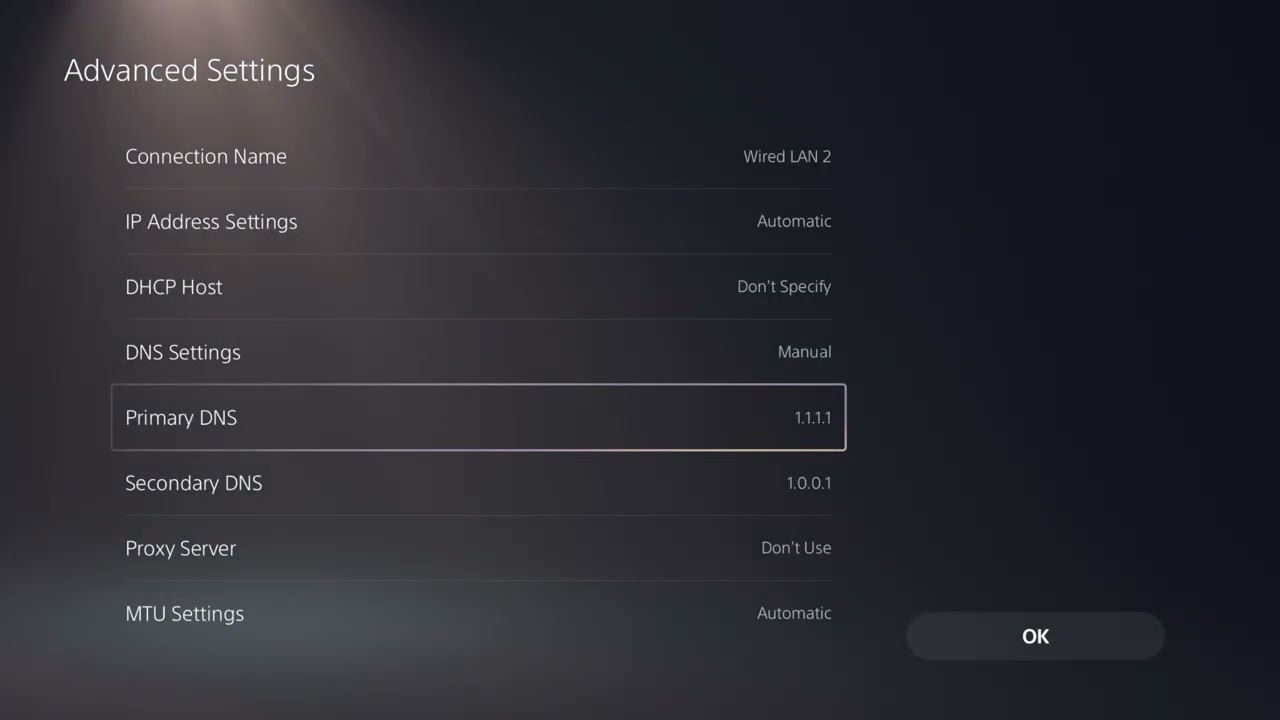
- Try DNS last. Edit the network’s advanced settings and enter Cloudflare DNS: primary
1.1.1.1, secondary1.0.0.1. Save and retest. Restore Automatic DNS if it makes no difference.
Why the Wi-Fi-band change can help
Automatic band selection can move a console between 2.4 GHz and 5 GHz as signal conditions change. A fixed band removes that transition during testing. Five gigahertz is generally faster at close range; 2.4 GHz usually reaches farther but may be more congested. Ethernet avoids both radio conditions.
If the server message remains
- Pause downloads and streaming on the console and other devices.
- Test a temporary phone hotspot to identify whether the home internet path is involved. Do not use it for a large update.
- Confirm the Activision account and PlayStation account are signed in correctly.
- Restore Automatic DNS if custom DNS did not help.
- Contact Activision Support with the exact title/version, service, time, ISP, and test results.
Warnings
- Do not pay for a “server unlock” or enter account details into an unofficial website.
- Do not change random router ports or disable router security as a first step.
- DNS does not bypass maintenance, account restrictions, or a retired service.
Optional network gear
A direct wired test with a Cable Matters Cat 6 Ethernet cable can help separate Wi-Fi instability from an Activision or PSN issue.
As an Amazon Associate I earn from qualifying purchases.
Frequently asked questions
Should I use 5 GHz or 2.4 GHz on PS5?
Use 5 GHz near the router for speed and lower local interference; test 2.4 GHz at longer range. The more stable result is the right choice for the console’s location.
Will 1.1.1.1 lower my ping?
Not necessarily. DNS helps the console find services; it does not change the physical route of live game traffic. Use it as a troubleshooting test.
Why can other games work when Black Ops cannot?
Each game uses different online services. An Activision-side issue or account session can affect one title while PSN and other games remain available.