Quick answer: Battlefront II error code 1066 on PS5 is usually handled as an online connection or account-session problem. Check EA and PlayStation status, close the game, restart the console and router, then test Ethernet. If Wi-Fi is required, select a stable frequency band. Confirm the correct EA account is linked before trying custom DNS.
Before you start
- Check EA server status and PlayStation Network status.
- Install pending Battlefront II and PS5 system updates.
- Confirm another online app or game can connect on the same console.
- Note whether 1066 appears at startup, after choosing multiplayer, or after an account-linking prompt.
How to fix Battlefront II error 1066
- Wait if the services are down. If EA or PSN reports an incident, do not reinstall the game. Try again after the service status returns to normal.
- Close and reopen Battlefront II. From the PS5 home screen, highlight the game, press Options, and choose Close Game. Relaunch and retry the online mode.
- Restart the PS5. Choose Power > Restart PS5. Avoid Rest Mode for this test because it may preserve the stalled session.
- Power-cycle the router. Disconnect power for about 30 seconds, reconnect it, and wait for the connection lights to stabilize. Then test the PS5 internet connection.
- Test Ethernet. Connect the console directly to the router and select the wired connection under Settings > Network > Settings > Set Up Internet Connection. If error 1066 disappears, the Wi-Fi path is the likely cause.
- Choose a fixed Wi-Fi band. Highlight the saved network, press Options, select Wi-Fi Frequency Bands, and test 5 GHz near the router or 2.4 GHz at longer range. The source walkthrough shows this change after the normal restart steps.
- Forget and reconnect to the network. Remove the saved Wi-Fi connection, join it again with the correct password, and rerun Test Internet Connection.
- Verify the EA account link. Sign in to the EA Account portal through EA’s official website and check the Connections page. Make sure the PlayStation account is linked to the expected EA account. Do not unlink accounts casually; EA warns that entitlements and progress may not transfer to a different account.
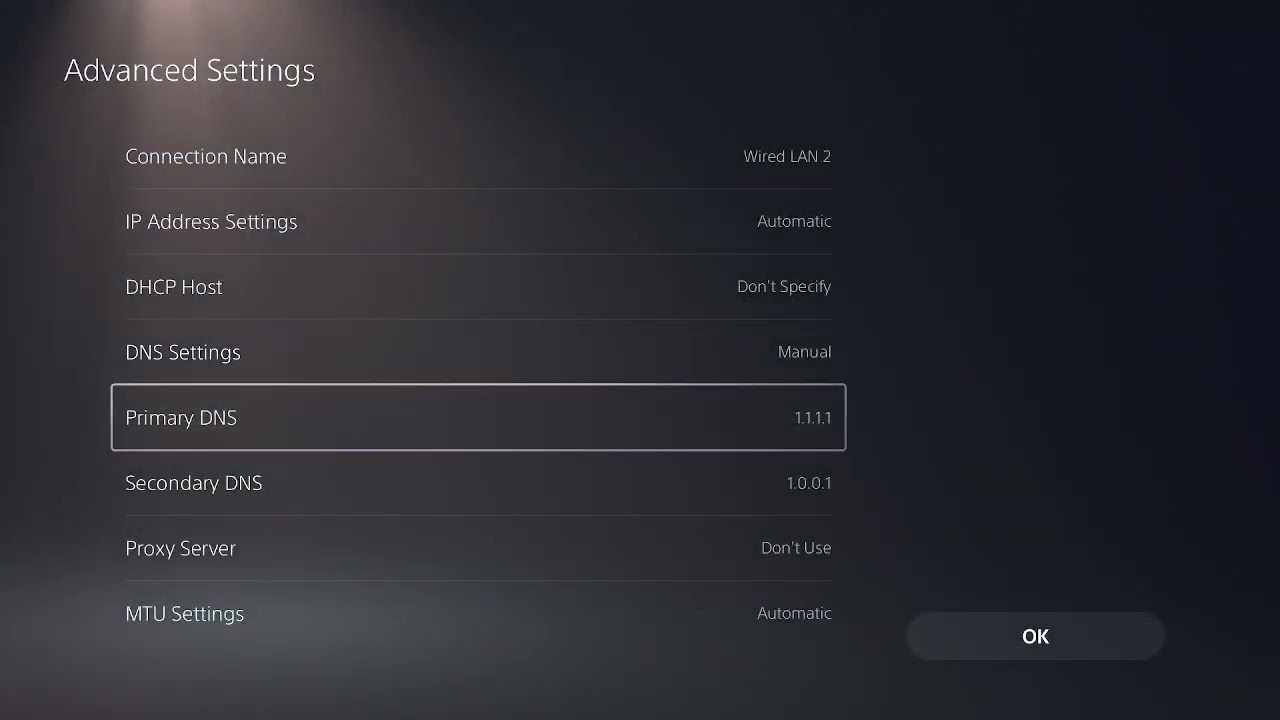
- Try trusted DNS only after the prior checks. In the network’s advanced settings, set primary DNS to
1.1.1.1and secondary DNS to1.0.0.1, save, and restart the console. Restore Automatic if it does not help.
Why these fixes work
Error 1066 can appear when the game cannot complete its session with EA services. A full restart clears a stale console or game session, Ethernet removes Wi-Fi interference from the test, and confirming the EA link addresses an account mismatch. DNS only helps if service-name lookup is failing; it cannot repair an EA outage or account restriction.
If error 1066 keeps returning
- Pause downloads and streaming on the PS5 and other home devices.
- Test a temporary phone hotspot to identify whether the home internet connection is involved.
- Restore Automatic DNS if custom DNS did not improve the result.
- Avoid unlinking the PlayStation account until EA Support confirms that is necessary.
- Contact EA Help with the error code, timestamp, PSN ID, linked EA account, ISP, and connection-test result.
Warnings
- Do not share EA or PlayStation credentials with anyone offering an unofficial fix.
- Do not disable router security, place the PS5 in a DMZ, or forward random ports as a first step.
- Reinstalling a large game is unlikely to help during a confirmed service outage.
Optional network gear
For a wired comparison test, a Cable Matters Cat 6 Ethernet cable can help isolate Wi-Fi instability.
As an Amazon Associate I earn from qualifying purchases.
Frequently asked questions
Is Battlefront II error 1066 always an EA outage?
No. It may be a service incident, a stale local session, unstable network path, or EA-account link issue. Check both service-status pages before changing anything.
Should I unlink my PlayStation account from EA?
Not as a routine fix. EA places restrictions on account linking, and moving a platform account can affect access to entitlements or progress. Contact EA Support first.
Does changing DNS fix error 1066?
Only when DNS resolution is part of the failure. It will not bypass maintenance or fix an account problem, so use it after restarts, status checks, and a wired test.