Quick answer: The Black Ops 7 TRAVIS–RILEA message usually means the PC client cannot complete its connection to Call of Duty online services. Check Activision’s live service status first, close bandwidth-heavy apps, then safely rebuild the game’s local configuration folders by renaming them instead of deleting them. If that does not help, repair the game files and test a wired connection before changing DNS.
Before you start
- Check Activision Online Services for a current outage. A local fix cannot restore an unavailable service.
- Close Black Ops 7, Call of Duty HQ, Battle.net or Steam, and the Xbox app if it is running.
- Pause downloads, cloud backups, streaming, and VPN or proxy software for one test.
- Make a note of custom graphics, controller, and accessibility settings. Rebuilding local configuration folders may reset them.
How to fix TRAVIS–RILEA in Black Ops 7 on PC
- Confirm the service is online. Open Activision’s service-status page and select Black Ops 7. Also check the status page for your launcher platform. If an incident is listed, wait and try again after the service recovers.
- Restart the complete session. Quit the game and launcher, restart Windows, and power-cycle the router by disconnecting it from power for about 30 seconds. Reconnect it, wait until internet service is stable, then launch the game once.
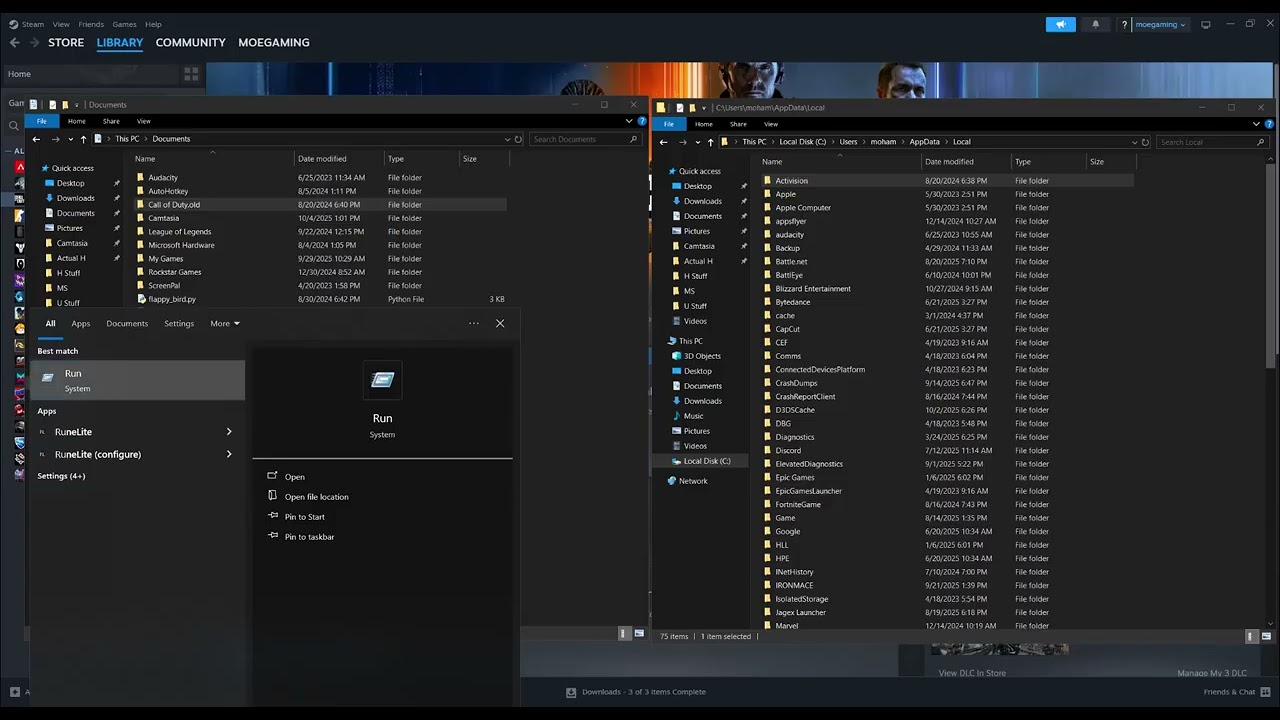
- Rename the Documents configuration folder. Open File Explorer and go to
Documents. Find theCall of Dutyfolder and rename it toCall of Duty.old. Do not delete it. The source video demonstrates this reset so the game can create a clean configuration on its next launch. - Rename the local Activision folder. Press Windows + R, enter
%LOCALAPPDATA%, and press Enter. If anActivisionfolder is present, rename it toActivision.old. Leave the backup in place until the game launches and your settings are confirmed. - Launch Black Ops 7 and retest. Start the normal launcher and allow the game to rebuild its local folders. Sign in and test an online mode. If the error is gone, reapply settings manually rather than copying the entire old folder back.
- Repair the installed game. In Battle.net, choose the gear beside Play and select Scan and Repair. In Steam, open Properties > Installed Files > Verify integrity of game files. In the Xbox app, use the game’s Manage > Files > Verify and Repair option when available.
- Test without a VPN and security filter. Disconnect VPNs and proxies. Keep Windows Security enabled, but allow the game and launcher through the firewall if Windows asks. Do not disable protection permanently.
- Test Ethernet. Connect the PC directly to the router if possible. This separates a weak or unstable Wi-Fi link from an Activision account or service problem.
- Try a trusted DNS resolver only as a final network test. If other service checks pass, use Cloudflare’s documented DNS addresses,
1.1.1.1and1.0.0.1, then restart the PC. DNS can fix name-resolution trouble but will not fix an Activision outage.
Why rebuilding the folders can work
Black Ops 7 stores local settings and cached connection data outside the main installation. A damaged or stale local file can survive a normal game-file repair because the launcher verifies the installation, not every user-specific configuration file. Renaming the folders preserves a rollback copy while forcing the game to generate clean defaults.
If the error continues
- Make sure Windows, the network-adapter driver, and the launcher are current.
- Sign out of the launcher, restart it, and sign back into the correct Activision-linked platform account.
- Test another network, such as a temporary phone hotspot, only to identify whether the home network is involved.
- If the clean folders do not help, close the game and rename the new folders, then restore the original folder names to recover your prior settings.
- Contact Activision Support with the exact error name, platform, launcher, time of failure, and troubleshooting already completed.
Warnings
- Rename configuration folders; do not permanently delete them before the game is tested.
- Do not forward random ports, disable the firewall, or install third-party “network optimizer” tools.
- Do not assume DNS is the fix when Activision reports a service outage.
Optional network gear
For a clean wired test, a Cable Matters Cat 6 Ethernet cable can help determine whether Wi-Fi instability is contributing to the connection failure.
As an Amazon Associate I earn from qualifying purchases.
Frequently asked questions
Will renaming the Call of Duty folder delete progress?
Online progression is tied to the account, but local graphics, controls, and other preferences can reset. Keeping the renamed folder provides a rollback copy.
Should I delete the Activision folder?
No. Rename it first. Deletion removes the easiest recovery path if the reset does not solve the problem.
Does TRAVIS–RILEA always mean my internet is down?
No. It can involve the Activision service, launcher session, local configuration, or the path between the PC and service. Check live status before changing settings.