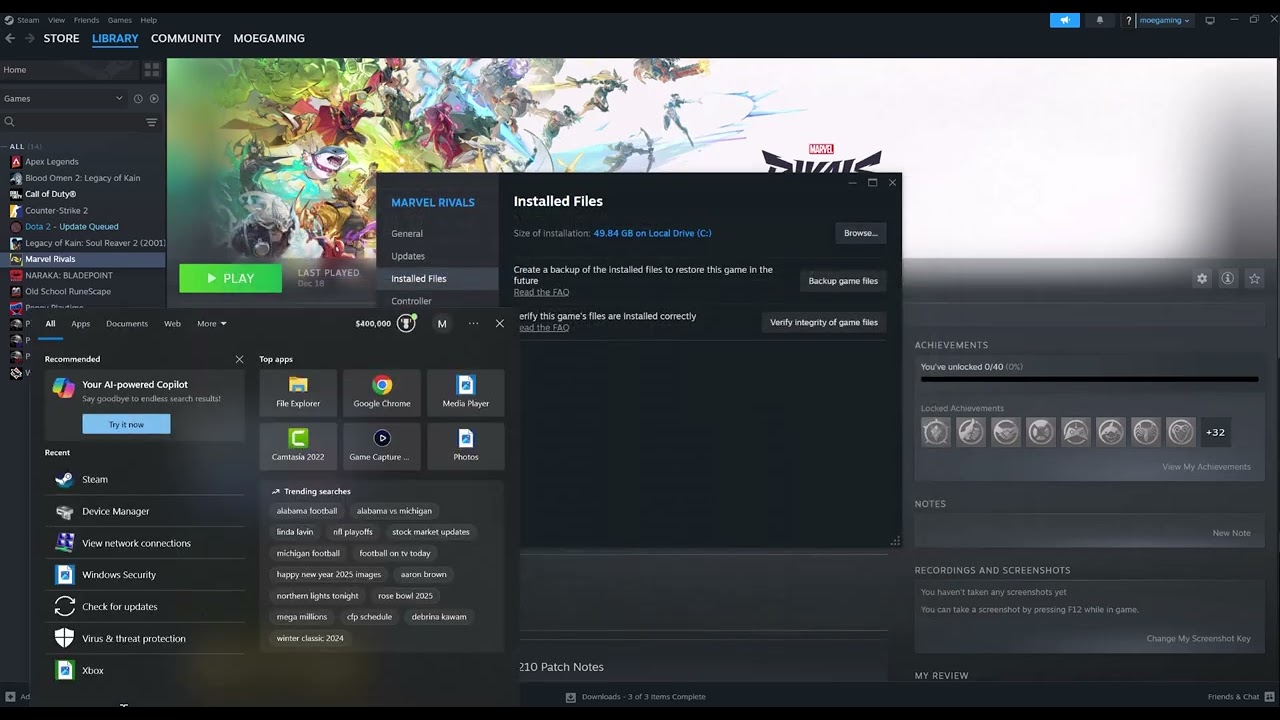
Quick answer: Marvel Rivals can show an Out of Video Memory message even on a graphics card with enough VRAM. Start by removing any CPU or GPU overclock, updating the game and graphics driver, and verifying the game files. If the PC uses a 13th- or 14th-generation Intel desktop processor, follow the official Marvel Rivals guidance: install the motherboard maker’s latest stable BIOS first. Only use Intel XTU to lower the performance-core ratio if the BIOS update does not solve the instability and you understand the change.
Before you start
- Check your CPU model, graphics card and available VRAM in Task Manager or the GPU control panel.
- Save work and create a restore point before changing firmware or tuning settings.
- Download BIOS files only from the exact motherboard or PC manufacturer support page.
Fix Marvel Rivals out of video memory
- Restart and return hardware to stock settings. Disable temporary CPU/GPU overclocks and close tuning utilities. Launch the game once with default clock and power settings.
- Update Marvel Rivals and Windows. Install the latest game patch and pending Windows updates, then restart. Do not test before the restart is complete.
- Install the current graphics driver. Use the official NVIDIA, AMD or Intel download page. Choose a clean installation when the vendor installer offers it, then restart the PC.
- Verify the game files. In Steam, open Library, right-click Marvel Rivals, choose Properties > Installed Files > Verify integrity. On Epic Games, open the game’s menu and choose Manage > Verify.
- Check for Intel 13th/14th-generation CPU instability. Marvel Rivals says these CPUs can produce stability problems, low-VRAM warnings or shader-compilation crashes. Install the latest stable BIOS supplied for your motherboard or prebuilt PC. Keep the system connected to reliable power and do not interrupt the update.
- Use Intel XTU only if necessary. The official game guide suggests reducing the performance-core ratio by two or three steps when the BIOS update is not enough—for example, 55x to 53x. Apply the smallest change, restart and test. If XTU is unsupported on the system, stop and contact the PC or motherboard maker.
- Reduce VRAM demand. If the error appears after the main menu loads, lower texture quality first, disable high-resolution texture options and close browsers, capture tools and overlays. Keep the page file system-managed unless a qualified support technician recommends otherwise.
Why the error can be misleading
During shader compilation, unstable CPU results or corrupted shader/game data can surface as a graphics-memory allocation failure. That explains why some players with high-end cards still see the message. On a genuinely VRAM-limited card, lowering texture memory use prevents the allocation from exceeding the available budget.
Alternatives if the error remains
- Test without Discord, GeForce, Xbox Game Bar or performance-monitor overlays.
- Reinstall Marvel Rivals after verification fails repeatedly or reports files it cannot repair.
- Contact the PC manufacturer or Intel if a supported BIOS and stock settings still produce shader crashes.
Warnings
A BIOS update or CPU multiplier change affects the whole PC, not just Marvel Rivals. Do not flash a BIOS for a different board, interrupt a firmware update or increase voltage. Lowering the core ratio may reduce peak CPU performance. Laptop and locked systems may not support XTU.
FAQ
Why do I get this with an RTX 4070 or 4080?
The message is not always proof that the GPU has run out of physical VRAM. The official guide specifically connects some low-VRAM warnings and shader crashes to Intel 13th/14th-generation CPU instability.
Should I increase virtual memory?
Leave the Windows page file on system-managed first. A custom page file can mask memory pressure but will not repair unstable hardware, corrupted files or an outdated driver.
Is lowering the P-core ratio permanent?
An XTU change can persist depending on configuration, but firmware updates or resets may change it. Record the original value so it can be restored.
Official references
Source video
As an Amazon Associate I earn from qualifying purchases.