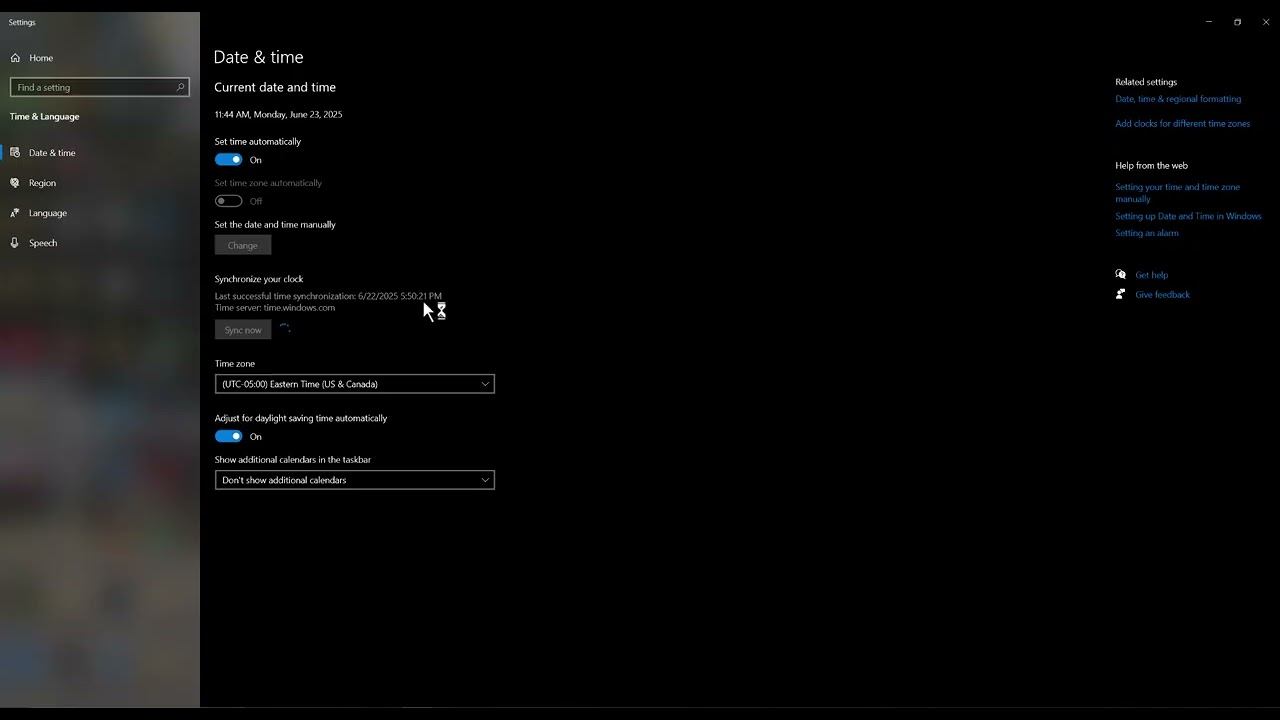
Quick answer: Open Windows Settings > Time & language > Date & time, enable automatic time and time zone, select Sync now, restart the Rockstar Games Launcher, and test again.
As an Amazon Associate I earn from qualifying purchases.
Before you start
- Close the Rockstar Games Launcher from the notification area.
- Make sure Windows can reach the internet.
- Note the correct local time zone; do not choose random zones to make the error disappear.
How to fix it
- Open Date & time. Right-click the taskbar clock and select Adjust date and time.
- Correct the time zone. Turn on Set time zone automatically, or choose your actual zone manually if automatic detection is unavailable.
- Enable automatic time. Turn on Set time automatically.
- Synchronize Windows. Under Additional settings, select Sync now and confirm the displayed time is correct.
- Restart the launcher. Reboot Windows, open Rockstar Games Launcher normally, and sign in again if prompted.
Why this can work
Secure sign-in and update services use time-limited certificates and tokens. If the PC clock is far from the real time, those checks can fail and the launcher may show an update or connection error. Correcting the clock fixes the validation environment without modifying game files.
Other safe fixes to try
- Check Rockstar service status before changing the PC.
- Install pending Windows updates.
- Temporarily disable a VPN or proxy and retry.
- Use Rockstar’s official launcher reinstall instructions if the clock is correct and the error remains.
Warnings and how to undo the change
Use your real time zone. The video mentions experimenting with zones, but that can create new sign-in and certificate problems and is not recommended. This change is reversible: turn off automatic settings and restore the previous values. Do not delete Social Club folders or run unknown repair utilities for this error.
Frequently asked questions
Why does the date matter to a game launcher?
Authentication certificates and tokens have validity windows that depend on an accurate clock.
Will syncing the time delete anything?
No. It changes only clock settings.
What if Sync now fails?
Verify the internet connection and Windows Time service, then install Windows updates before retrying.
Official references
Source video
The menu path demonstrated in this Moe Gaming video was used as source material and checked against the official guidance linked above.