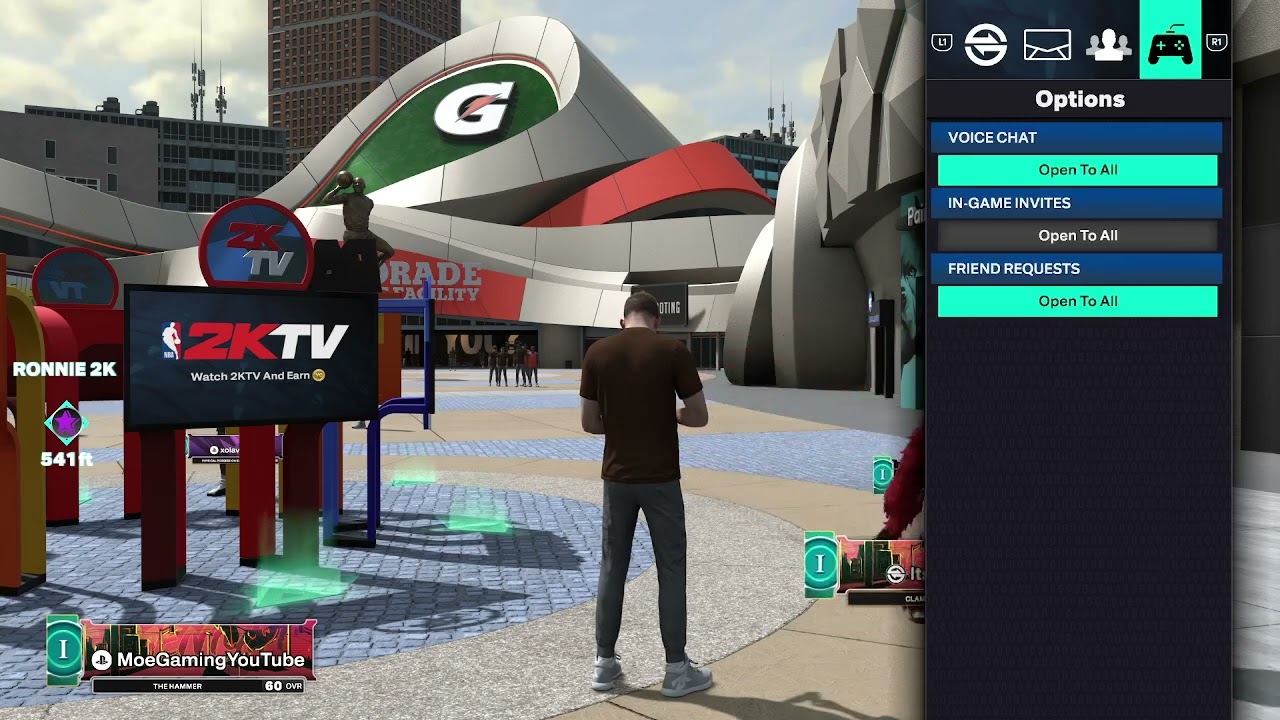
Quick answer: While you are in The City or another supported online mode, open Social, choose Voice Chat, and set voice chat to Open to All. Everyone who wants to talk must enable the setting. This menu path comes from the source video; the option can be absent in some modes or platform/account configurations.
Before you start
- Make sure NBA 2K26 is fully updated and you are connected to its online services.
- Connect a working headset or microphone and confirm that the platform detects it.
- Leave console party chat or a Discord voice channel if you want to use in-game chat.
- Check parental controls, privacy settings, and communication permissions for every account involved.
Enable NBA 2K26 voice chat
- Enter The City, Park, or the online mode where you want to talk.
- Open the Social menu.
- Select Voice Chat.
- Change the setting to Open to All.
- Ask the other player to repeat the same steps on their system.
- Return to the session and test the microphone. If you are in a console party, switch to game chat first.
This is an in-game, video-derived menu path rather than a published 2K support procedure. A viewer reported that the option did not appear, so treat the path as mode- and platform-dependent rather than universal.
Why this works
Open to All removes the game’s most restrictive voice-channel filter. It does not override PlayStation, Xbox, Steam, or family-account privacy controls, and it cannot make a blocked or disconnected microphone work. Both players must be in the same supported voice channel.
If Open to All is missing
- Back out to the main menu, install any NBA 2K26 update, and reconnect to the online mode.
- Check the console or PC microphone input and make sure NBA 2K26 is allowed to use it.
- Review the account’s privacy and parental-control rules for voice communication.
- Leave party chat, restart NBA 2K26, and try the in-game Social menu again.
- If you stream through cloud gaming or capture software, test ordinary in-game chat first. This setting does not control whether a stream records other players’ voices.
Warnings and how to undo the change
Open voice chat can expose you to strangers. Mute or report abusive players and do not share personal information. To undo the change, return to Social > Voice Chat and select a more private option or disable voice chat. Platform privacy settings can also block communication.
Optional headset recommendation
As an Amazon Associate I earn from qualifying purchases.
If your current microphone is faulty, this gaming headset is a direct product option. A new headset will not fix a hidden menu, privacy restriction, or service outage, so test those first.
Frequently asked questions
Why can I hear teammates but they cannot hear me?
Confirm the correct input device, unmute the headset, and check microphone permissions. On consoles, switch from party chat to game chat.
Why is Voice Chat missing?
The menu can vary by mode, platform, region, age settings, or account permissions. Update the game, enter a supported online area, and review privacy controls.
Will this make recorded streams capture other players?
Not necessarily. Capture and streaming privacy rules are separate from NBA 2K26’s in-game channel setting.