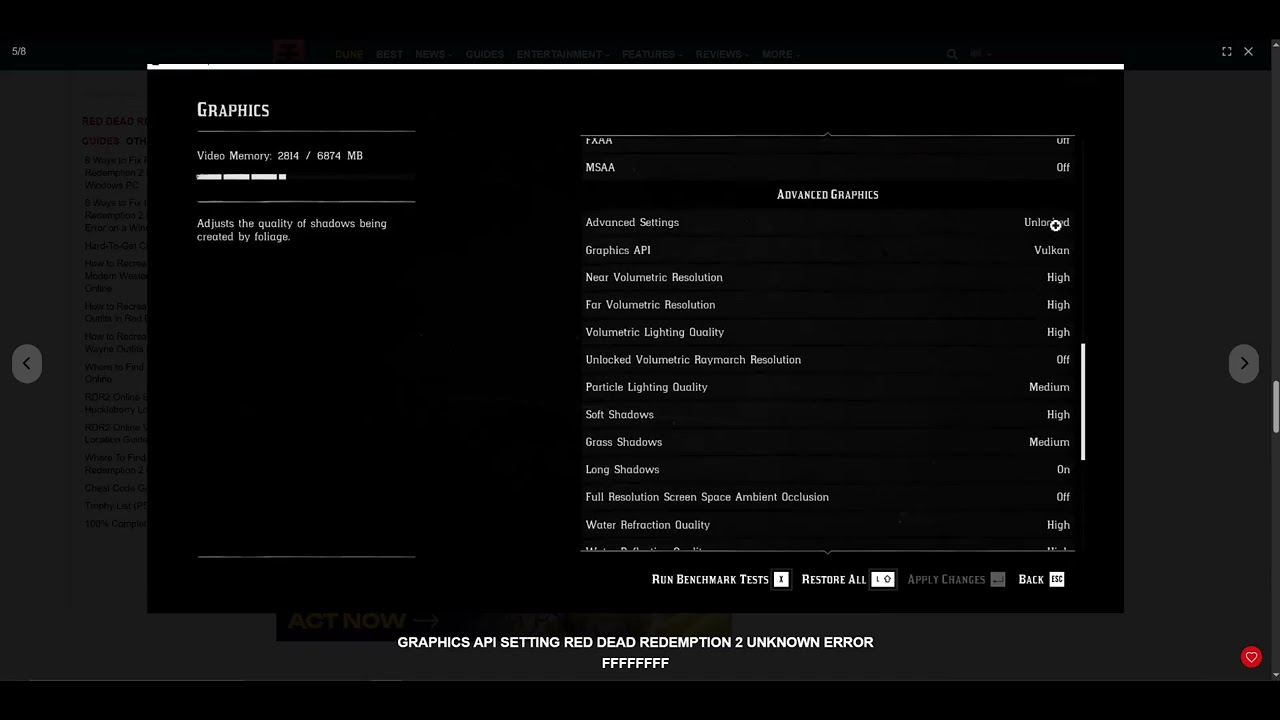
Quick answer: In Red Dead Redemption 2, open Settings > Graphics, unlock Advanced Settings, and switch Graphics API from Vulkan to DirectX 12—or to Vulkan if you already use DX12. Apply the change and restart the game. Rockstar lists the same API switch in its official Error FFFFFFFF guidance.
This is a reversible graphics workaround. It may solve a driver or pipeline-cache conflict, but it is not guaranteed to fix every FFFFFFFF crash.
Before you start
- Note your current Graphics API and display settings.
- Close recording overlays and save other work before restarting.
- Install the latest stable GPU driver from NVIDIA, AMD, or Intel.
- Make sure the game and launcher are fully updated.
Switch the graphics API
- Launch Red Dead Redemption 2 and open Settings.
- Select Graphics.
- Scroll to Advanced Settings and change it to Unlocked.
- Find Graphics API.
- If it is set to Vulkan, choose DirectX 12. If it is already DX12, test Vulkan instead.
- Apply the changes, exit the game, and restart it.
- Test the same activity that previously produced FFFFFFFF.
If the game crashes before the menu
Rockstar’s official article provides a manual fallback using DocumentsRockstar GamesRed Dead Redemption 2Settingssystem.xml. Back up that file before editing it. Change the API token only as Rockstar describes; do not download somebody else’s configuration file.
Officially supported follow-up checks
- Update the graphics driver. Use the GPU manufacturer’s official download or app, then restart Windows.
- Check external audio devices. Rockstar notes that some audio devices can trigger FFFFFFFF. Test launching before connecting a headset or speakers.
- Verify the installation. In Rockstar Games Launcher, open Settings, select RDR2 under My installed games, and choose Verify Integrity. Steam and Epic have equivalent verify commands.
Why changing Vulkan or DX12 can help
The two APIs use different driver paths and shader/pipeline caches. Switching can bypass a damaged cache or a driver-specific crash. It can also change performance and visual behavior, so treat it as a diagnostic choice rather than a universal “best” setting.
Warnings and undo
- Changing the API can cause the next launch to take longer while shaders rebuild.
- Do not delete the entire Settings folder. Back up
system.xmlbefore manual edits. - To undo, select the original API in the Graphics menu or restore your backed-up file.
- If temperatures, artifacts, or driver resets occur in other games, stop testing and troubleshoot the GPU separately.
Frequently asked questions
Is Vulkan or DirectX 12 better for RDR2?
There is no single answer for every GPU and driver. Use the API that is stable on your system and compare performance after the error is gone.
Will this affect Red Dead Online progress?
No. The API setting is local graphics configuration and does not reset your Rockstar account progress.
What if both APIs crash?
Verify files, update the GPU driver, test audio devices, and use Rockstar Support with your launcher logs and system information.
Official references
Source video
As an Amazon Associate I earn from qualifying purchases.
Leave a Reply