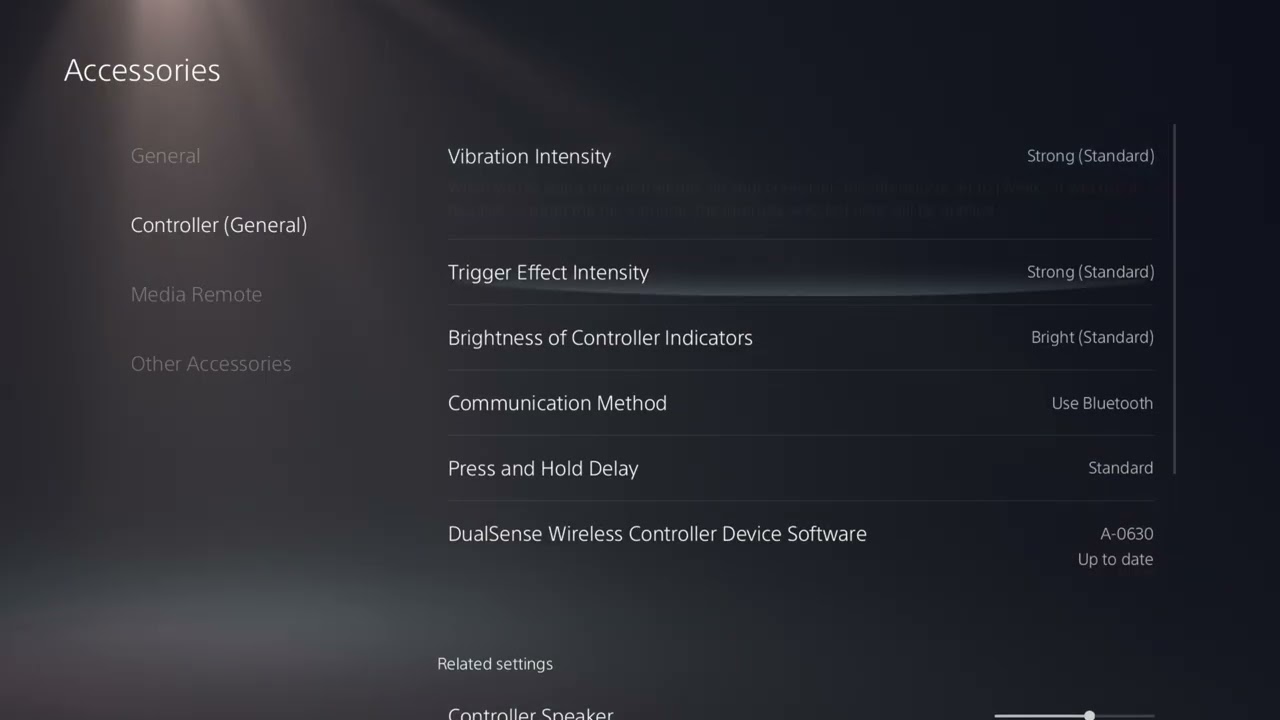
If Black Ops 2 reacts a fraction of a second after you move or press a button on PS5, the first fix is to make the controller communicate over USB instead of Bluetooth. This is especially useful when the game is running through backward compatibility and the controller feels delayed even in a private or offline match.
Before you change anything
- Use a USB-C cable that supports charging and data. A charge-only cable cannot carry controller input.
- Test in an offline or private match first. That separates controller delay from online ping or rubber-banding.
- Close Black Ops 2 before changing the controller communication setting.
How to remove controller input delay
1. Connect the controller with a data-capable USB cable
Plug the DualSense or supported DUALSHOCK 4 controller directly into the PS5. If the controller only charges but does not pair or send input over the cable, try the cable supplied with the console or another cable marked for charge and sync. PlayStation specifically notes that charge-only cables do not work for wired controller communication.
2. Force the PS5 to use the wired connection
On the PS5 home screen, open Settings, select Accessories, choose Controller (General), then open Communication Method. Change the setting from Use Bluetooth to Use USB Cable. PlayStation confirms that a controller set to Bluetooth continues using Bluetooth even while a cable is connected, so merely plugging it in is not enough.
3. Relaunch Black Ops 2 and compare the response
Start the game again and test camera movement, aiming and menu navigation. Compare the wired result with the same action over Bluetooth. If the delay disappears, Bluetooth interference or a weak wireless signal was the likely cause.
4. Check the controller and USB path
If the delay remains, try another PS5 USB port and another data-capable cable. Update the controller device software and PS5 system software, then restart the console. If you own another controller, test it briefly; a single-controller problem points to that controller rather than the game.
If the game still feels delayed
- Turn on Game Mode on the TV or monitor. Heavy picture processing can create display latency that feels like controller lag.
- Test offline. If inputs feel immediate offline but players teleport online, troubleshoot the network rather than the controller.
- Check the network separately. Use the dedicated Black Ops 2 lag guide for ping, Wi-Fi and DNS symptoms.
- Reset the controller only if needed. Follow PlayStation’s controller troubleshooting steps before assuming the controller is defective.
Why the USB setting can help
Wired communication removes the Bluetooth radio link between the controller and console. That does not increase the game’s frame rate or reduce internet ping, but it can remove interference or wireless transmission delay. The important detail is selecting Use USB Cable; otherwise the PS5 can keep sending input over Bluetooth.
Common mistakes and warnings
- Do not confuse controller input delay with low frame rate or network lag.
- Do not buy a new controller before testing a known-good data cable and another USB port.
- Performance thumbsticks can change grip and stick height, but they do not repair latency.
- Changing the communication method applies at the console level, not only to Black Ops 2.
Frequently asked questions
Why is my controller still using Bluetooth while plugged in?
The PS5 communication method may still be set to Use Bluetooth. Change it manually under Settings > Accessories > Controller (General).
Will this fix online lag?
No. It targets the controller-to-console link. Online stutter, teleporting and high ping require network troubleshooting.
Does the cable matter?
Yes. It must support data transfer. A charge-only cable powers the controller but cannot provide wired input.
Watch the original walkthrough
The Moe Gaming video demonstrates the exact PS5 menu path used in this guide. Source video: How to Fix Black Ops 2 Controller Input Lag and Delay PS5.
Optional controller gear
If testing confirms that your controller itself is faulty, the PlayStation DualSense Wireless Controller is a direct replacement. For players who want a different stick feel after the latency is fixed, KontrolFreek PlayStation Performance Thumbsticks are an optional accessory, not a latency fix.
Affiliate disclosure: As an Amazon Associate I earn from qualifying purchases.