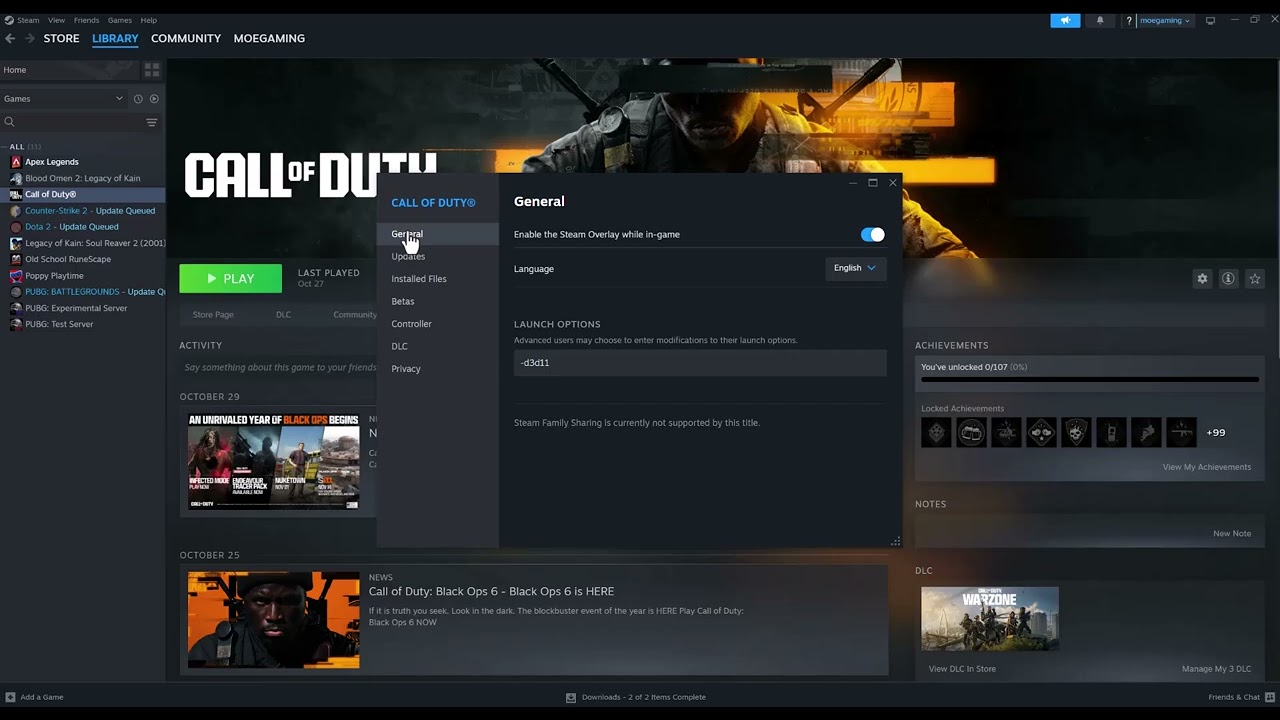
Black Ops 6 error 0x00001337 is a PC crash rather than a single confirmed hardware diagnosis. Damaged game files, an interrupted update, background hooks, unstable overclocks, outdated drivers, or unsupported hardware can produce similar symptoms. Use the supported checks in order instead of applying random DLL or registry changes.
Quick answer: Update Black Ops 6, Windows, and the GPU driver; verify or repair the game files; close overlays, monitoring tools, and background apps; return CPU, GPU, and RAM settings to stock; then reinstall only if the crash remains.
Before you start
- Record whether the error happens at launch, during shader compilation, or after entering a match.
- Remove any custom Steam or Battle.net launch option before testing.
- Confirm the PC meets the current Black Ops 6 requirements.
- Restart the PC so a pending update is not holding game files open.
Fix error 0x00001337
- Install pending updates. Update Black Ops 6 in the launcher, install Windows updates, and install the stable driver for the exact NVIDIA, AMD, or Intel GPU. Restart after the updates.
- Repair the game files. In Steam, right-click Black Ops 6 > Properties > Installed Files > Verify integrity of game files. In Battle.net, use the Scan and Repair option. In the Xbox app, select the game’s three-dot menu > Manage > Files > Verify and Repair.
- Close interfering software. Exit third-party overlays, FPS counters, RGB utilities, capture tools, MSI Afterburner/RivaTuner, and other nonessential background apps. Activision specifically recommends closing applications that may interfere with the game or launcher.
- Return hardware tuning to stock. Temporarily disable GPU overclocks, CPU overclocks, undervolts, and aggressive memory profiles. Test at default settings. A crash that disappears at stock settings points to instability rather than a missing game file.
- Launch from the normal launcher. Remove compatibility-mode changes and launch the game normally through Steam, Battle.net, or the Xbox app. Running both the launcher and game with mismatched administrator settings can prevent a normal start.
- Check storage and system requirements. Keep free space on the game and Windows drives. Compare the installed CPU, RAM, GPU, Windows build, and DirectX support with Activision’s current requirements.
- Reinstall as the final software step. Uninstall Black Ops 6 from the launcher, restart Windows, and install a clean copy. Test before restoring overlays, tuning tools, or custom configuration.
Why these fixes work
File verification repairs missing or altered assets without replacing the entire game. A clean background-app test removes software that injects an overlay or hardware-monitoring hook. Stock clock settings rule out memory and GPU instability. Together, those checks isolate the major causes without changing Windows security settings.
Avoid these risky shortcuts
Do not download DLL files, disable Windows security features, or make broad registry changes. The source video demonstrates administrator and DirectX launch options, but viewer feedback was mixed, and Black Ops 6 is designed around current DirectX support. Those changes can create a second launch problem, so they are not part of the safe primary flow.
If 0x00001337 continues
- Check Activision’s Black Ops 6 known-issues page for a current patch-related crash.
- Use the launcher’s support option to collect crash details and report the error.
- If many unrelated apps also crash, troubleshoot Windows or hardware stability rather than repeatedly reinstalling only the game.
- If the error began immediately after enabling an overlay or overclock, leave that feature disabled while testing.
- If the game changes to a missing-content or installation error, use our Black Ops 6 installation guide instead.
Warnings
- Do not erase saved data or unlink the Activision account for this PC crash.
- Do not update a motherboard BIOS unless the board or CPU vendor specifically documents the need and you understand the recovery process.
- One repaired file after verification can be normal; test the game before assuming the drive has failed.
Frequently asked questions
Is 0x00001337 always a GPU error?
No. It is a crash code with several possible causes. Repair files and test a clean, stock configuration before replacing hardware.
Should I run Black Ops 6 as administrator?
Use the default launcher configuration first. Administrator mode is not Activision’s primary repair step and mismatched privileges can stop the launcher and game from communicating.
Will file verification delete progress?
No. Online progression is associated with the account. File verification checks the local installation.
Watch the source video
Official references
- Activision: Black Ops 6 PC troubleshooting
- Activision: Black Ops 6 known issues
- Activision: Black Ops 6 PC system requirements
- Steam Support: Verify integrity of game files
Affiliate disclosure: As an Amazon Associate I earn from qualifying purchases. No product was added here because the safe fixes do not require new hardware.