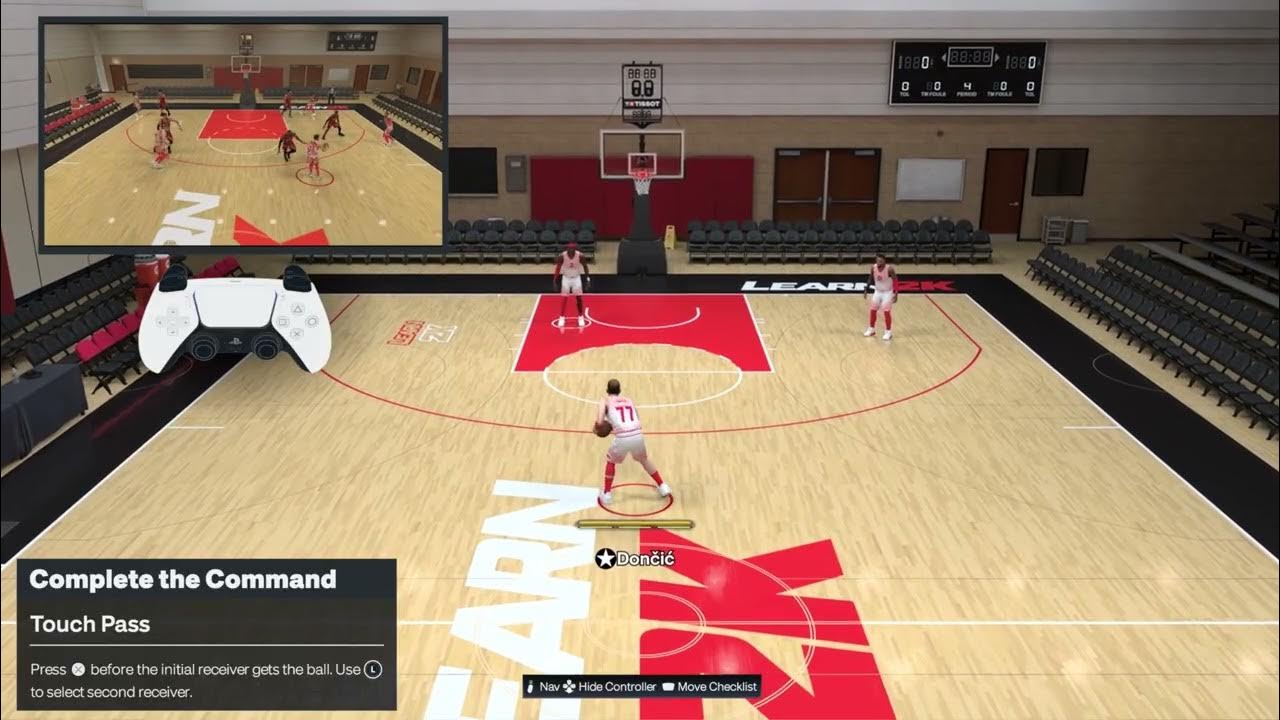
Quick answer: In Moe Gaming’s NBA 2K27 PS5 touch-pass demonstration, press X for the next pass before the first receiver catches the ball. Aim the next pass at an open teammate and watch it redirect on reception. The separate self alley-oop video shows moving toward the hoop and pressing Square + Triangle together to request a self toss; that combination is an unofficial video-derived method, not a guaranteed control verified by 2K for every preset or game mode. Respond to the current on-screen catch/finish prompt rather than memorizing a fixed second button.
Before you try either move
- These videos demonstrate NBA 2K27 on a PlayStation controller. Confirm your active preset and on-screen passing or finishing prompt.
- Practice in Learn 2K or an offline game before using either input in an online possession. A mistimed pass can be intercepted or thrown away.
- Keep an open second receiver for the touch pass; leave a clear route to the rim for the self alley-oop.
- No account, security, or controller setting needs to change. If the action fails, stop requesting it and play the possession normally.
1. Redirect the ball with a touch pass
- Identify the teammate who is about to receive your first pass.
- While that first pass is still in flight, choose the next open teammate using the passing target shown by your current on-screen controls.
- Press X once before the first receiver catches the ball, as the touch-pass video narrates.
- Watch whether the receiving teammate redirects the ball immediately. If they catch and hold it instead, try your input earlier and check that the second passing lane remains open.
Why the timing matters: the pass request must be queued while the receiver is still preparing for the catch. The next teammate and the defenders’ passing lanes determine whether the redirect is useful. The clip is evidence for this X-before-catch sequence; 2K’s current public gameplay overview discusses passing improvements but does not publish a touch-pass input table, so follow the game’s live controller prompt if it differs.
2. Test the self alley-oop shown in the second video
- Build momentum toward the basket with space ahead of the ball handler.
- As narrated in Moe Gaming’s clip, press and briefly hold Square and Triangle together to request the self-toss attempt.
- Watch for the toss and the ball’s approach. Use the on-screen receiving or dunk-timing prompt when it appears; its button can depend on the pass direction.
- If no toss starts, do not keep holding the buttons through a contested drive. Stop the attempt, finish normally or reset the possession and check the current Learn 2K prompt.
Important limitation: the clip’s spoken Square + Triangle combination has not been independently confirmed as a universal NBA 2K27 self alley-oop input. It may work only with the demonstrated controller layout, context, timing or mode. 2K officially says that alley-oop receiving in NBA 2K27 uses directional buttons (for example Square for a pass arriving from the left) or a correctly timed Pro Stick flick; those receiving instructions are not confirmation of the clip’s initiation combination. A self toss can fail or turn into another animation, and success depends on timing, ratings, space and the defender.
Alternatives and warnings
- If the touch pass arrives too late, make a normal X pass after the catch. Do not queue a blind pass through a defender.
- If the self toss does not register, try a normal drive or a teammate’s alley-oop and use 2K’s official directional catch timing. There is no setting to undo: release the buttons and play normally.
- Do not treat a missed attempt as proof that the controller is broken. Animation selection, attributes, defender position and online latency affect both actions.
- Control presets and updates can change prompts. The current in-game instruction takes priority over a narrated video.
Frequently asked questions
When do I press X for a touch pass?
Before the first receiver catches the in-flight ball. Once they have already settled with the ball, X is a normal new-pass request rather than the video’s immediate redirect.
Is Square + Triangle the official NBA 2K27 self alley-oop input?
No official 2K source checked for this guide confirms that initiating combination. It is the video’s unofficial method and may work only in some cases; the game’s live prompts are authoritative for your mode and preset.
Why does the alley-oop finish button change?
2K says the receiving button maps to the direction the pass is arriving from, and a timed Pro Stick flick is another receiving option. Watch the prompt instead of assuming Square always finishes the play.
Will either move change my account or controller settings?
No. These are in-game button requests, not system or account changes. The practical downside is a turnover or missed possession if you attempt them at the wrong time.
Official references
- 2K’s NBA 2K27 gameplay guide: passing, intuitive alley-oop receiving and timing
- NBA 2K27 official FAQ and platform information
- NBA 2K Support
As an Amazon Associate I earn from qualifying purchases. This guide makes no product recommendation because these passing inputs do not require new equipment.