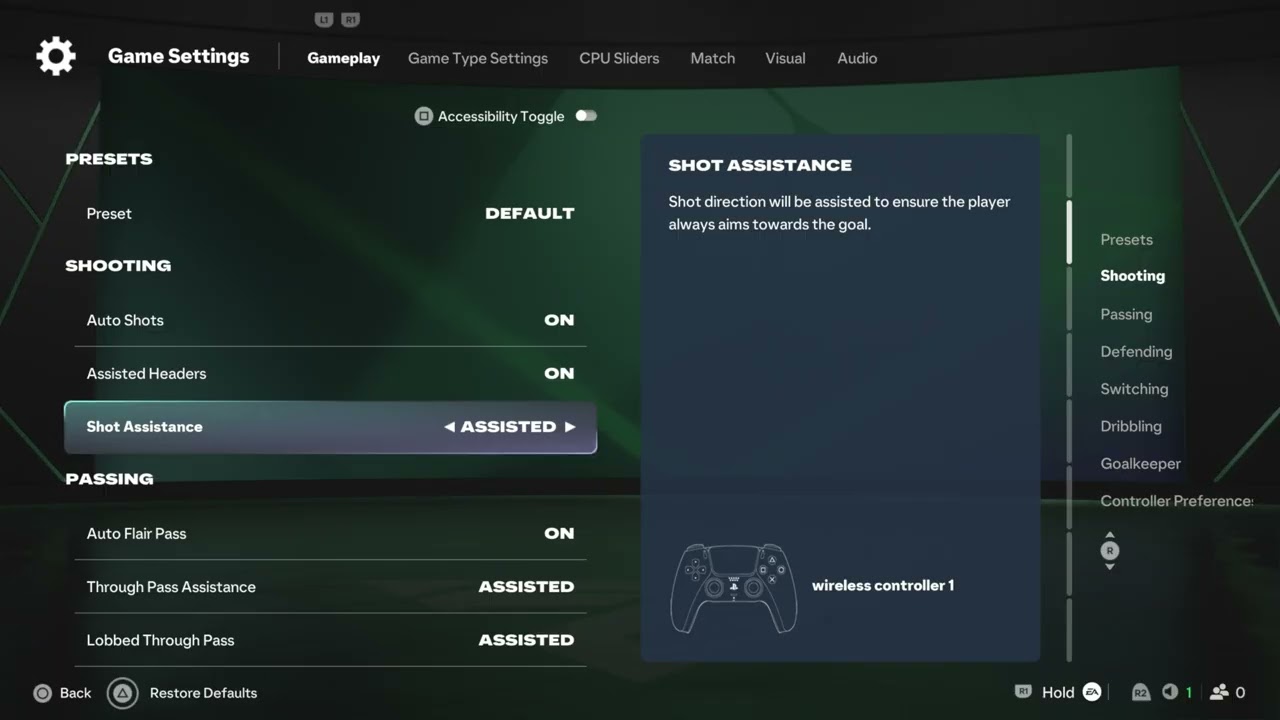
Quick answer: From the FC 27 home screen, open Settings. Use Shooting > Shot Assistance to choose Assisted, Precision, or Manual aiming. Use Gameplay > Auto Shots to allow or block automatic close-range shots. Change one setting at a time, test it in practice, and return to your previous value if it feels worse.
Before you change the settings
- Note the current Shot Assistance and Auto Shots values.
- Use an offline practice mode or low-stakes match for testing.
- Check whether the selected online mode enforces competitive settings.
- Expect menu wording or availability to change after updates.
Change Shot Assistance
- From the main FC 27 home screen, open Settings.
- Choose Shooting.
- Highlight Shot Assistance.
- Select Assisted, Precision, or Manual.
- Apply the setting and test several shots in practice.
What each Shot Assistance option does
- Assisted: adds the most aiming help. This is the easiest starting point when shots are regularly going far from the intended target.
- Precision: still provides assistance but places more weight on the direction of your input.
- Manual: gives direct control with minimal aiming correction and therefore demands the most accurate stick direction.
These behavior descriptions come from the in-game labels demonstrated in the source video. Your preferred setting depends on your controller, play style, and any rules imposed by the mode you enter.
Turn Auto Shots on or off
- Return to the main Settings screen.
- Open Gameplay.
- Find Auto Shots.
- Choose On to allow automatic shots in short-reaction situations, or Off to require your own shot input.
- Save the change and test it in practice.
Why these settings matter
Shot Assistance changes how much the game corrects the direction you provide. Auto Shots controls whether the game may trigger a close-range attempt when there is little reaction time. Adjusting them can make the input feel more predictable, but it does not fix network delay, controller drift, or inconsistent timing.
A sensible testing method
- Start with Assisted Shot Assistance and your current Auto Shots value.
- Take ten similar shots from the same practice position.
- Change only Shot Assistance and repeat the test.
- Restore that value, then test Auto Shots separately in close-range situations.
- Keep the combination that feels most consistent rather than copying another player’s setup.
Alternatives if shooting still feels wrong
- Recalibrate or test the controller for stick drift.
- Use a wired connection or stable low-latency display mode if input feels delayed.
- Confirm that the match type has not forced a different controller preset.
- Practice shot timing before changing several assists at once.
- Restart the game after an update if a saved setting appears not to apply.
Warnings and limitations
- Some competitive modes can restrict or standardize assistance settings.
- Manual is not automatically “better”; it trades correction for direct control.
- Auto Shots cannot compensate for poor positioning, lag, or an exhausted player.
- Do not reset every controller setting at once unless you have recorded the original values.
- Menu paths are based on the current FC 27 build shown in the videos and may move after updates.
How to undo the change
Return to the same menu and select the value you recorded before testing. If you cannot remember it, use the game’s restore-defaults option only after taking screenshots of any other customized controls.
Frequently asked questions
Should I use Assisted, Precision, or Manual?
Start with Assisted. Try Precision when you want more directional control, and use Manual only when you can aim consistently without much correction.
Does Auto Shots make every shot automatic?
No. The in-game description shown in the source video limits it to certain close-range, short-reaction situations.
Why did the option change in an online match?
The selected mode may enforce a competitive preset. Check the mode rules and test your personal setting offline.
Will these settings fix input delay?
No. They change shooting behavior, not network latency or display delay. Troubleshoot those separately.
Official reference
Source videos
The exact menu paths and option descriptions below come from Moe Gaming’s FC 27 demonstrations. EA’s live menus and mode rules remain authoritative.
As an Amazon Associate I earn from qualifying purchases.