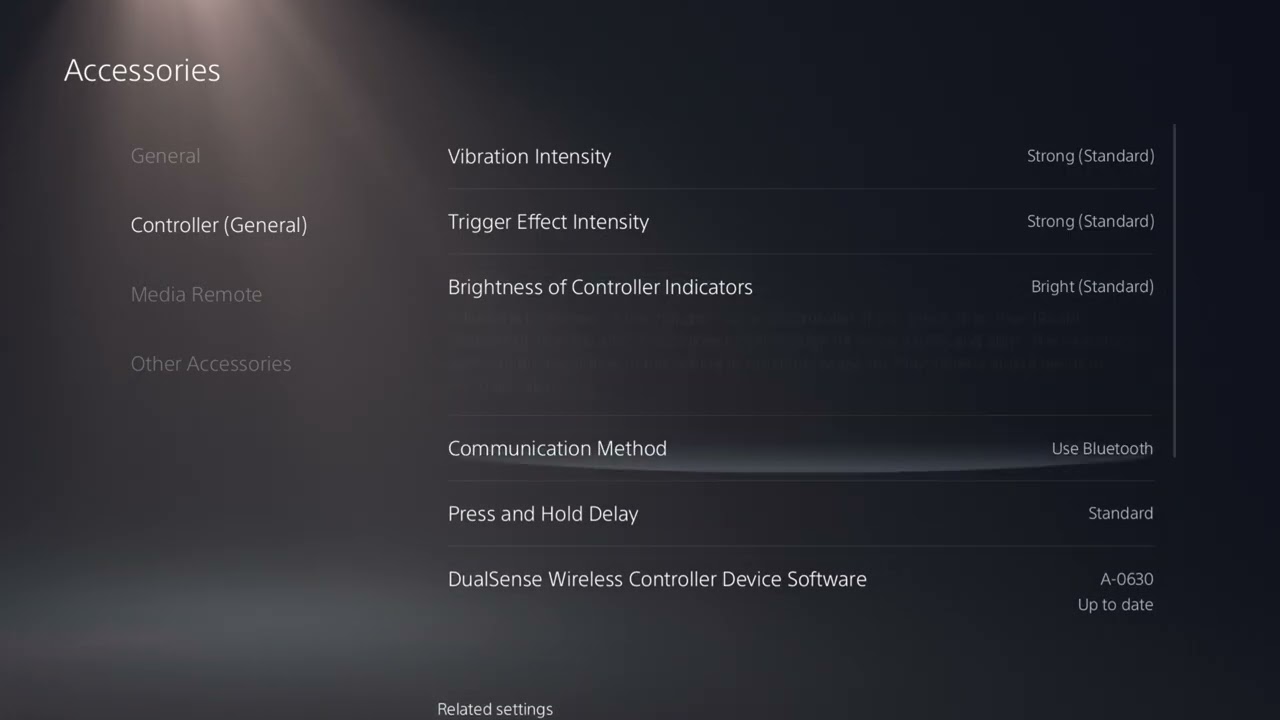
Quick answer: Update the DualSense device software, connect the controller with a USB cable that carries data, and set PS5 Settings > Accessories > Controller (General) > Communication Method to Use USB Cable. Then test in an offline NBA 2K27 mode. If offline control is responsive but online play is delayed, troubleshoot the connection rather than replacing the controller.
This guide combines the exact actions demonstrated in Moe Gaming’s source video with current first-party support information. Menu names can move after updates, so use the current on-screen label when it differs slightly.
Before you start
- Use a USB cable capable of data transfer; many charge-only cables cannot carry controller input.
- Charge the controller and disconnect unnecessary USB devices for the test.
- Test the same action in an offline practice mode and an online game so controller delay is not confused with network lag.
1. Update DualSense device software
- Connect the controller to the PS5.
- Open Settings > Accessories > Controller (General).
- Install any available DualSense wireless controller device software update.
- Restart the PS5 after the update and test again.
Controller firmware updates can address compatibility and stability issues without changing game data.
2. Force a true USB data connection
- Connect the DualSense directly to a PS5 USB port with a data-capable cable.
- Open Settings > Accessories > Controller (General) > Communication Method.
- Select Use USB Cable.
- Keep the cable connected and test NBA 2K27 offline.
PlayStation states that Use USB Cable sends the controller signal through USB when connected. If the cable only charges, this test will not work as intended.
3. Check the display path
- Enable Game Mode or a low-latency mode on the TV or monitor.
- Disable unnecessary motion smoothing and image interpolation.
- Connect the PS5 directly to the display for one test if a receiver or capture device is in the path.
- Confirm the display is using the intended input and refresh mode.
Display processing can make every button press appear late even when the controller signal arrives normally.
4. Separate controller delay from online latency
- Test dribbling, menus, or shot timing in an offline practice mode.
- Run a second test in the affected online mode.
- If only online play is delayed, use wired Ethernet, check 2K status, and avoid congested Wi-Fi.
- If every PS5 menu and game is delayed, test another controller or cable.
This split prevents replacing a working controller for a server or network problem.
5. Reset the controller only if delay affects the whole console
- Turn off the PS5.
- Use the small reset button on the back of the DualSense for the interval described by PlayStation support.
- Reconnect it to PS5 with USB and press the PS button.
- Reapply the USB Communication Method and retest.
A reset can repair pairing state, but it will not reduce server ping or television processing delay.
Why these steps work
The workflow isolates four separate stages: controller firmware and transport, display processing, game behavior, and online latency. Changing one layer at a time reveals where the delay actually begins.
Warnings and common mistakes
- A USB cable must support data, not only charging.
- Do not buy a new controller until you test offline play, another cable, and display Game Mode.
- Shot timing can vary by online latency and game mechanics even when button input is healthy.
Relevant gaming gear
As an Amazon Associate I earn from qualifying purchases.
- DualSense wireless controller — optional equipment; buy only if it fits the specific setup described above.
- DualSense charging station — optional equipment; buy only if it fits the specific setup described above.
Watch the original Moe Gaming walkthrough
Frequently asked questions
Does Use USB Cable always reduce delay?
It creates a stable wired input path for testing, but the perceived improvement depends on interference, display processing, and the game.
Why is NBA 2K27 delayed only online?
That points to network or server latency rather than the DualSense connection. Use the PS5 lag guide.
Will turning vibration off fix input delay?
It changes feedback, not the input or network path. It may feel different, but it is not the primary latency fix.