Quick answer: Check NBA 2K service status first. If services are healthy, connect the PS5 by Ethernet for the best test. On Wi-Fi, open Settings > Network > Settings > Set Up Internet Connection, press Options on the network, and test 5 GHz when near the router or 2.4 GHz when farther away. Restart the console and router, stop competing downloads, and test again.
This guide combines the exact actions demonstrated in Moe Gaming’s source video with current first-party support information. Menu names can move after updates, so use the current on-screen label when it differs slightly.
Before you start
- Note whether lag occurs in every online game or only NBA 2K27.
- Check 2K and PlayStation service status before changing settings.
- Avoid changing several network options at once; compare one controlled test at a time.
1. Rule out a service incident
- Open 2K’s official server-status page.
- Check PlayStation Network status.
- If friends in different locations have the same issue, wait for the service to recover.
- Do not reinstall the game during an acknowledged outage.
Local changes cannot repair a game-server or platform outage.
2. Test wired Ethernet
- Connect the PS5 directly to the router with a known-good Ethernet cable.
- Open Settings > Network > Settings > Set Up Internet Connection and select the wired connection.
- Run Test Internet Connection, then play the same mode again.
- If Ethernet fixes the lag, focus on Wi-Fi placement or congestion rather than the game installation.
Ethernet removes wireless interference and roaming decisions, providing the cleanest local network baseline.
3. Choose the correct Wi-Fi band
- Open Set Up Internet Connection and highlight the connected Wi-Fi network.
- Press Options and select Wi-Fi Frequency Bands.
- Try 5 GHz when the PS5 is close to the router with few obstacles.
- Try 2.4 GHz when distance or walls weaken 5 GHz.
- Retest the same mode after each change.
5 GHz can be faster and less congested at short range; 2.4 GHz usually reaches farther. Automatic is not inherently broken, so keep it if it consistently chooses the better link.
4. Reduce congestion and packet loss
- Pause console and household downloads or cloud backups.
- Restart the modem/router and PS5; wait for the network to come fully online.
- Move the console/router away from interference and avoid an overloaded extender.
- Use the router’s supported quality-of-service controls only if you understand them.
Stable latency matters more than headline download speed for online basketball.
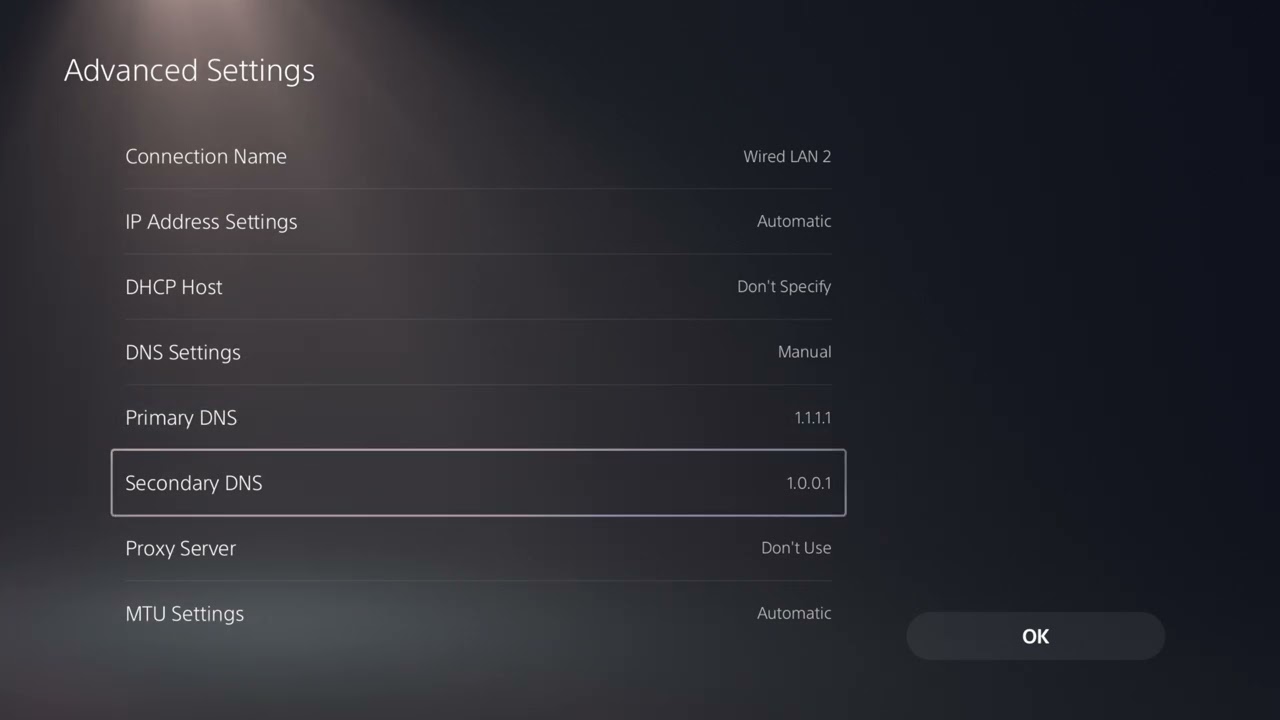
5. Use manual DNS only as a fallback
- Leave IP address and DHCP settings automatic.
- If name-resolution problems are suspected, test a reputable resolver such as Cloudflare 1.1.1.1 and 1.0.0.1.
- Save, restart the connection, and compare results.
- Return to Automatic if there is no improvement.
DNS helps translate service names to addresses; it does not directly lower in-game ping once a connection is established.
Why these steps work
The sequence distinguishes service-side problems from local wireless issues. Ethernet establishes a baseline, band selection improves radio conditions, and congestion testing addresses packet delay without making risky router changes.
Warnings and common mistakes
- Do not claim that changing DNS is a universal ping fix.
- Do not factory-reset the router unless its owner understands the configuration and has a backup.
- A fast download result can still hide jitter or packet loss.
Relevant gaming gear
As an Amazon Associate I earn from qualifying purchases.
- Cable Matters Cat 6 Ethernet cable — optional equipment; buy only if it fits the specific setup described above.
- PS5/PC-compatible wireless gaming headset — optional equipment; buy only if it fits the specific setup described above.
Watch the original Moe Gaming walkthrough
Frequently asked questions
Should I force 5 GHz?
Use it when signal strength is good and the router is nearby. At longer range, 2.4 GHz may be steadier. Compare actual gameplay.
Will 1.1.1.1 reduce NBA 2K27 latency?
It can help DNS resolution problems, but it does not control the game-server route or guarantee lower ping.
Why does only NBA 2K27 lag?
The affected mode, 2K service region, game server, or account session may be involved. Check status and compare other NBA 2K27 modes before changing the whole network.