Quick answer: Close NBA 2K27, restart the PS5, install the latest game and system updates, and make sure storage is not nearly full. Restore the game licenses next; this does not delete saved data. If crashes continue, use PS5 Safe Mode to Clear System Software Cache and then Rebuild Database. Reinstall the game only after protecting saved data and completing the safer checks.
This guide combines the exact actions demonstrated in Moe Gaming’s source video with current first-party support information. Menu names can move after updates, so use the current on-screen label when it differs slightly.
Before you start
- Record where the crash occurs and any error code.
- Sync or back up saved data before a reinstall.
- Confirm the console has ventilation and enough free storage.
- Avoid deleting NBA 2K reserved space.
1. Restart and update
- Close NBA 2K27 instead of leaving it suspended.
- Restart the PS5.
- Highlight the game, press Options, and choose Check for Update.
- Open Settings > System > System Software > System Software Update and Settings and install available updates.
A clean restart loads current game and system components and clears a temporary suspended state.
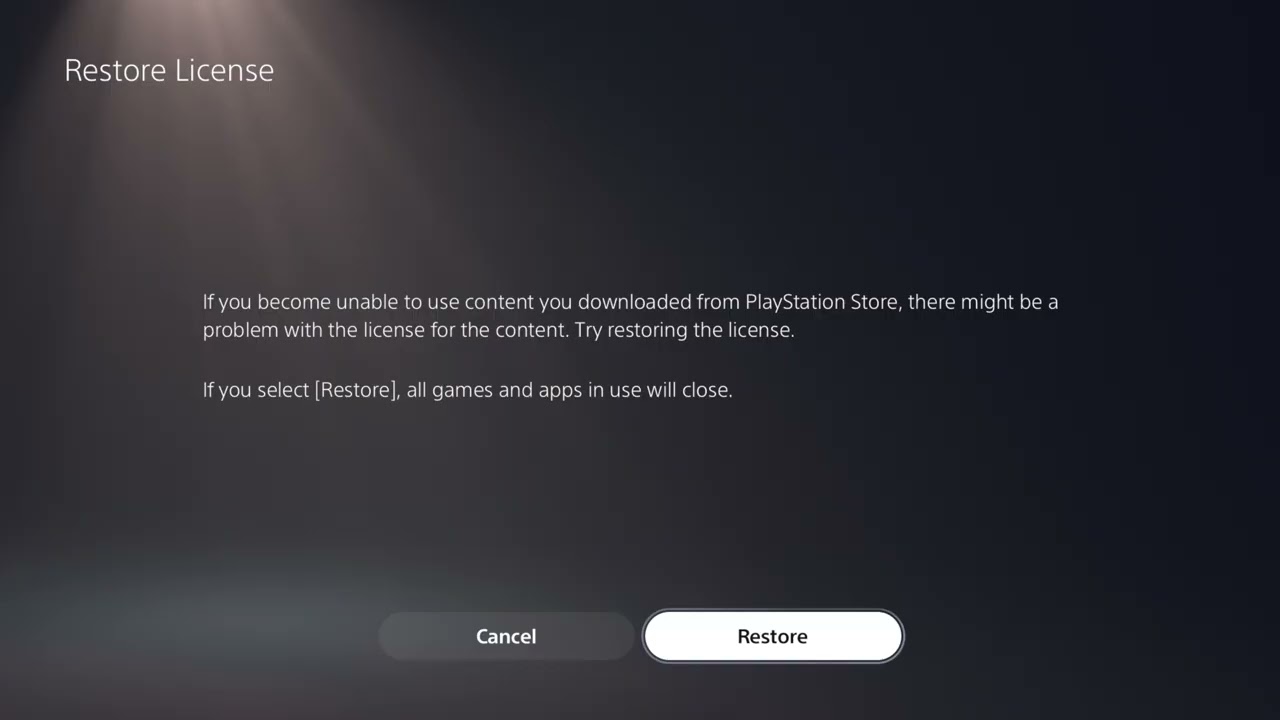
2. Restore the game license
- Open Settings > Users and Accounts > Other > Restore Licenses.
- Choose Restore and wait for completion.
- Restart NBA 2K27 and test the same action.
PlayStation says restoring licenses does not affect data. It can repair an entitlement check without reinstalling the game.
3. Check storage and heat
- Make sure the internal SSD has reasonable free space.
- Remove dust only with the console powered down and follow PlayStation cleaning guidance.
- Keep vents unobstructed and test without an enclosed cabinet.
- If the entire PS5 shuts down or displays heat warnings, stop and investigate cooling.
Crashes that affect multiple games or power off the console point beyond a single NBA 2K27 file.
4. Clear cache and rebuild the database
- Turn off the PS5 completely.
- Hold the power button until the second beep and connect the controller by USB.
- Choose Clear Cache and Rebuild Database.
- Run Clear System Software Cache first; if needed, return and choose Rebuild Database.
These Safe Mode options refresh system indexes and cached software data. Read the on-screen description and do not select Reset PS5.
5. Reinstall NBA 2K27 last
- Confirm saved data is synced or backed up.
- Delete the game application—not saved data or reserved space.
- Download the correct NBA 2K27 edition again and wait for the full installation and updates.
- Launch and test before adding optional downloads.
A clean application installation can replace files that update checks did not repair, but it should follow the faster, safer fixes.
Why these steps work
The order moves from temporary state and supported updates to entitlement repair, console health, system indexing, and finally full application replacement. It protects saves while isolating whether the problem affects only NBA 2K27.
Warnings and common mistakes
- Do not choose Reset PS5 in Safe Mode for a game crash.
- Do not delete reserved space; 2K warns against it.
- If several games crash or the PS5 powers off, contact PlayStation support or inspect the console environment rather than repeatedly reinstalling NBA 2K27.
Relevant gaming gear
As an Amazon Associate I earn from qualifying purchases.
- WD_BLACK SN850P PS5 M.2 SSD — optional equipment; buy only if it fits the specific setup described above.
- DualSense wireless controller — optional equipment; buy only if it fits the specific setup described above.
Watch the original Moe Gaming walkthrough
Frequently asked questions
Does Restore Licenses delete MyCAREER saves?
No. PlayStation states that restoring licenses does not affect data.
Should I rebuild the PS5 database?
It is a supported Safe Mode step after updates and restarts. Read the menu carefully and do not choose a reset option.
Why does NBA 2K27 crash only in one MyCAREER file?
That may indicate a save- or account-specific problem. Preserve the file and use 2K’s missing/corrupted MyCAREER guidance instead of deleting it.