Quick answer: Start with Steam’s Verify integrity of game files tool, then restart Windows and confirm that the PC meets NBA 2K27’s requirements. Install current Windows and GPU updates and close overlays or monitoring tools for one test. Avoid forcing Windows 8 compatibility mode as a first fix; NBA 2K27 officially requires a current 64-bit Windows 10 environment.
This guide combines the exact actions demonstrated in Moe Gaming’s source video with current first-party support information. Menu names can move after updates, so use the current on-screen label when it differs slightly.
Before you start
- Save any open work and restart Windows once.
- Confirm that NBA 2K27 is installed on an SSD and the PC supports AVX2 and DirectX feature level 12.0.
- Remove undocumented Steam launch options before testing.
1. Verify the Steam installation
- Open Steam and select Library.
- Right-click NBA 2K27 and choose Properties.
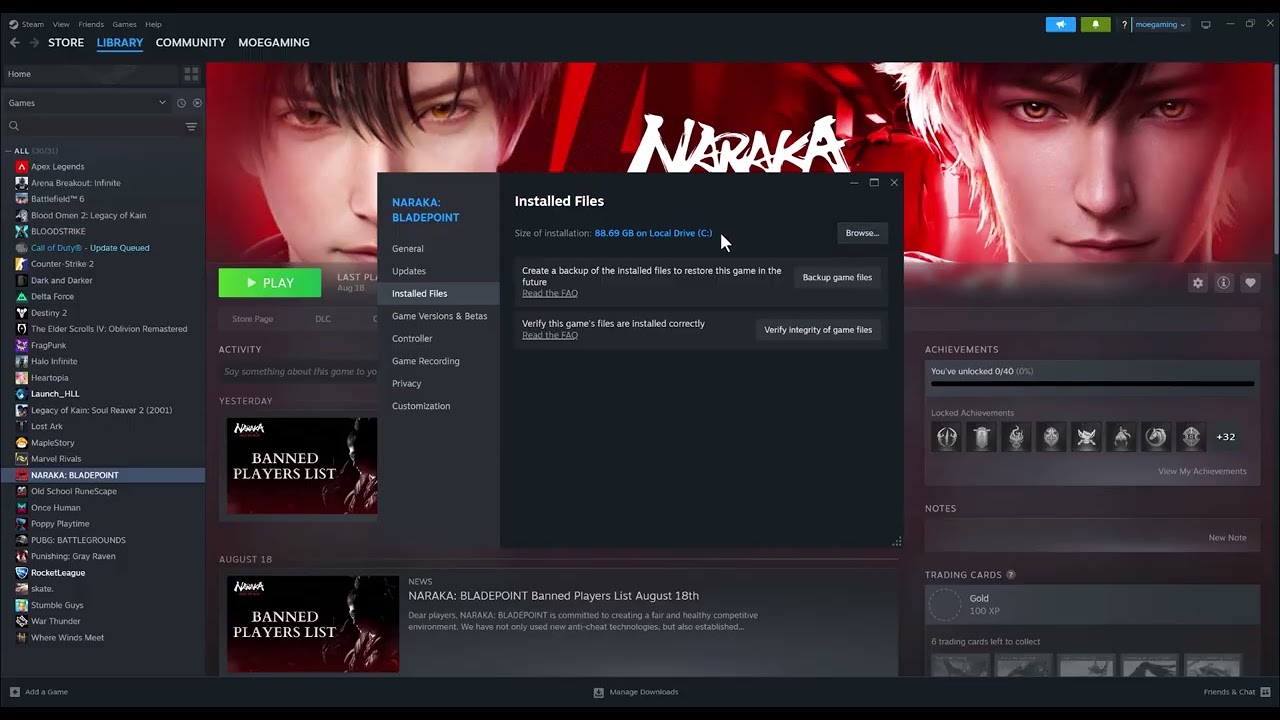
- Open Installed Files and select Verify integrity of game files.
- Wait for Steam to finish and reacquire any missing files, then restart Steam.
Verification compares the local installation with Steam’s current manifest. It is the least disruptive way to repair a missing or altered executable, library, or game asset.
2. Check the official PC requirements
- Press Win + R, run dxdiag, and note the CPU, memory, Windows version, and GPU.
- Confirm the game is on an SSD and the processor supports AVX2.
- Make sure the GPU exposes DirectX feature level 12.0—not merely that the PC has the DirectX 12 runtime.
A PC can install the game yet fail at launch when a required CPU instruction, feature level, memory amount, or storage type is missing.
3. Update Windows and the graphics driver
- Install pending Windows updates and restart.
- Download the current supported driver directly from NVIDIA, AMD, or Intel for the installed GPU.
- Restart again after the driver installation and let the game finish any shader preparation.
Current system components and a cleanly loaded graphics driver remove common launch and device-reset causes.
4. Isolate software conflicts
- Close frame-rate overlays, RGB tools, capture hooks, hardware monitoring, and third-party tuning utilities.
- Return CPU, GPU, and memory tuning to stable defaults for the test.
- Temporarily test with nonessential antivirus features disabled only if the vendor explains how; restore protection immediately afterward.
Overlays and low-level monitoring utilities can hook the same graphics or input processes used by a game. Testing without them identifies a conflict without deleting the game.
5. Use compatibility or administrator settings only as a targeted fallback
- Open the NBA 2K27 installation folder from Steam.
- If permissions are the confirmed problem, test Run this program as administrator once.
- Remove the setting if it makes no difference. Do not leave Windows 8 compatibility enabled by default.
The source video demonstrates compatibility and administrator options, but compatibility mode can misrepresent the operating environment. Verification, requirements, supported updates, and conflict testing should come first.
Why these steps work
These steps separate a damaged installation from an unsupported PC or a system-level conflict. File verification repairs game data; requirement checks catch hard incompatibilities; driver and conflict tests address the environment in which the executable starts.
Warnings and common mistakes
- Do not download replacement DLL files or “DirectX repair” packages from third-party sites.
- Do not delete Steam cloud saves while troubleshooting a launch issue.
- Reinstall only after verification and the system checks fail; reinstalling cannot add missing CPU or GPU capabilities.
Relevant gaming gear
As an Amazon Associate I earn from qualifying purchases.
- PS5/PC-compatible wireless gaming headset — optional equipment; buy only if it fits the specific setup described above.
Watch the original Moe Gaming walkthrough
Frequently asked questions
Why does Steam say all files are valid but NBA 2K27 still crashes?
The installation may be intact while the PC lacks a required capability or a driver, overlay, security tool, or unstable tuning profile interferes at launch.
Should I use Windows 8 compatibility mode?
Not as the normal configuration. NBA 2K27’s official requirements call for current 64-bit Windows 10. Compatibility mode is a narrow diagnostic fallback, not a universal fix.
Will verifying files delete MyCAREER progress?
Steam verification replaces game installation files; it is not intended to erase account or save progress. Avoid manually deleting save or userdata folders.