Quick answer: NW-102315-2 is a PlayStation Network communication error. Check PSN status, restart the PS5, use Ethernet where possible, and recreate the connection. On Wi-Fi, move closer to the router. Turn off the modem/router for at least five minutes, update its firmware, and try public DNS only as a temporary, reversible test.
Before you start
- Note whether the error affects sign-in, downloads or only one game.
- Save the Wi-Fi password.
- Check other devices on the same network.
- Do not factory-reset the router or expose the PS5 through DMZ.
Fix NW-102315-2
- Check PSN status. Wait through maintenance or a service incident.
- Restart and reconnect. Restart the PS5, forget the saved network and set it up again.
- Use Ethernet. A wired test bypasses Wi-Fi congestion and interference.
- Improve Wi-Fi placement. Reduce obstructions and test 5 GHz near the router or 2.4 GHz farther away.
- Restart network equipment. Power off modem/router for at least five minutes, reconnect and wait until it is ready.
- Update router firmware. Use the vendor’s exact model instructions or ask the ISP.
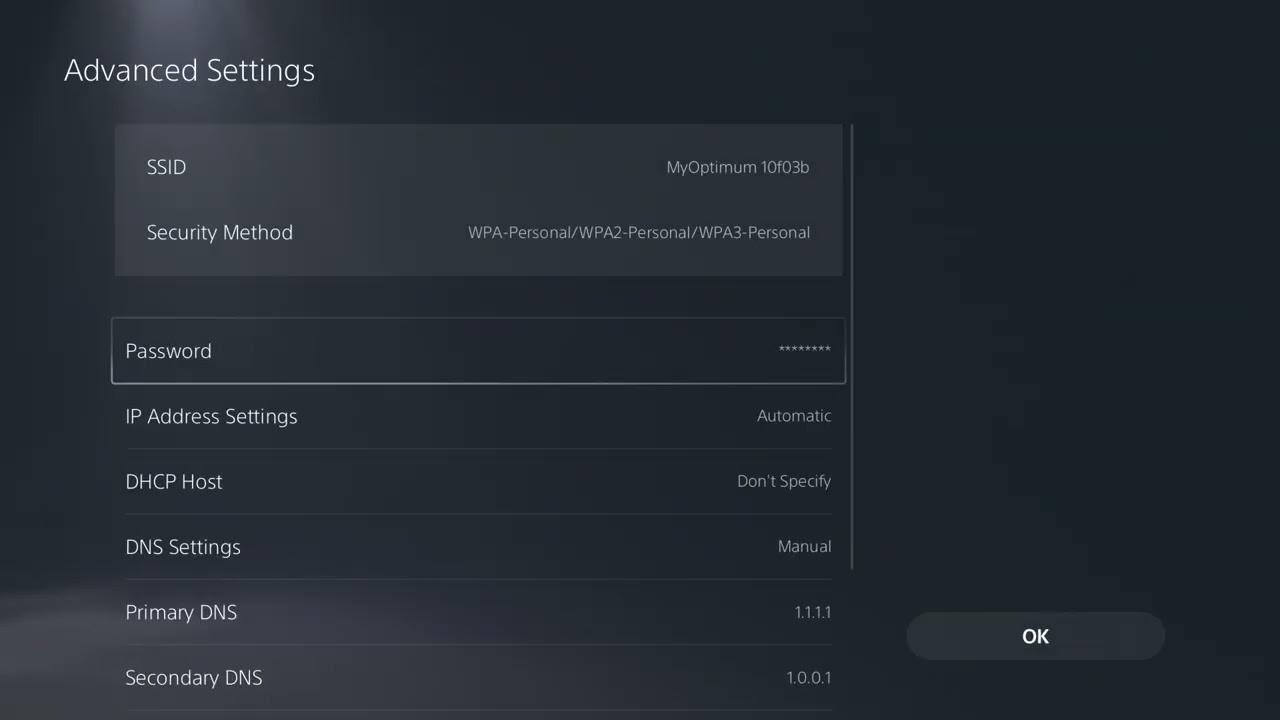
- Optional DNS test. Under the saved connection’s Advanced Settings, try a complete public DNS pair such as Cloudflare 1.1.1.1 / 1.0.0.1. Return to Automatic if it does not help.
- Escalate advanced routing. PlayStation lists port and static-IP changes, but ask the ISP or network administrator rather than copying random values.
Why this works
The error means communication with PlayStation Network failed. Service checks prevent unnecessary local changes. Ethernet and better placement address radio loss, while a long router restart clears stale routing and address state. DNS may help only if name resolution is the failing layer.
Alternatives
- Try a phone hotspot briefly as a diagnostic, watching data usage.
- Pause large household uploads and downloads.
- Test later if the connection is busy but local equipment is healthy.
- Contact PlayStation Support with the time, ISP and network-test results.
Warnings
Opening ports and static addressing can create conflicts or weaken the network if done incorrectly. Have the network owner or ISP handle them. To undo the source video’s DNS workaround, return DNS to Automatic and save the connection.
FAQ
Is NW-102315-2 a console hardware error?
PlayStation describes it as a communication error, so test service and network causes first.
Does public DNS improve Wi-Fi?
No. It changes lookups, not signal strength.
How long should I unplug the router?
PlayStation’s code page says at least five minutes.
Official references
NW-102379-2 uses the same PS5 connection sequence
PlayStation’s current NW-102379-2 instructions match this canonical network workflow: check PSN, restart the PS5, prefer wired Ethernet, recreate the network, improve Wi-Fi placement, power off the router for at least five minutes and update router firmware.
Original source video
As an Amazon Associate I earn from qualifying purchases.