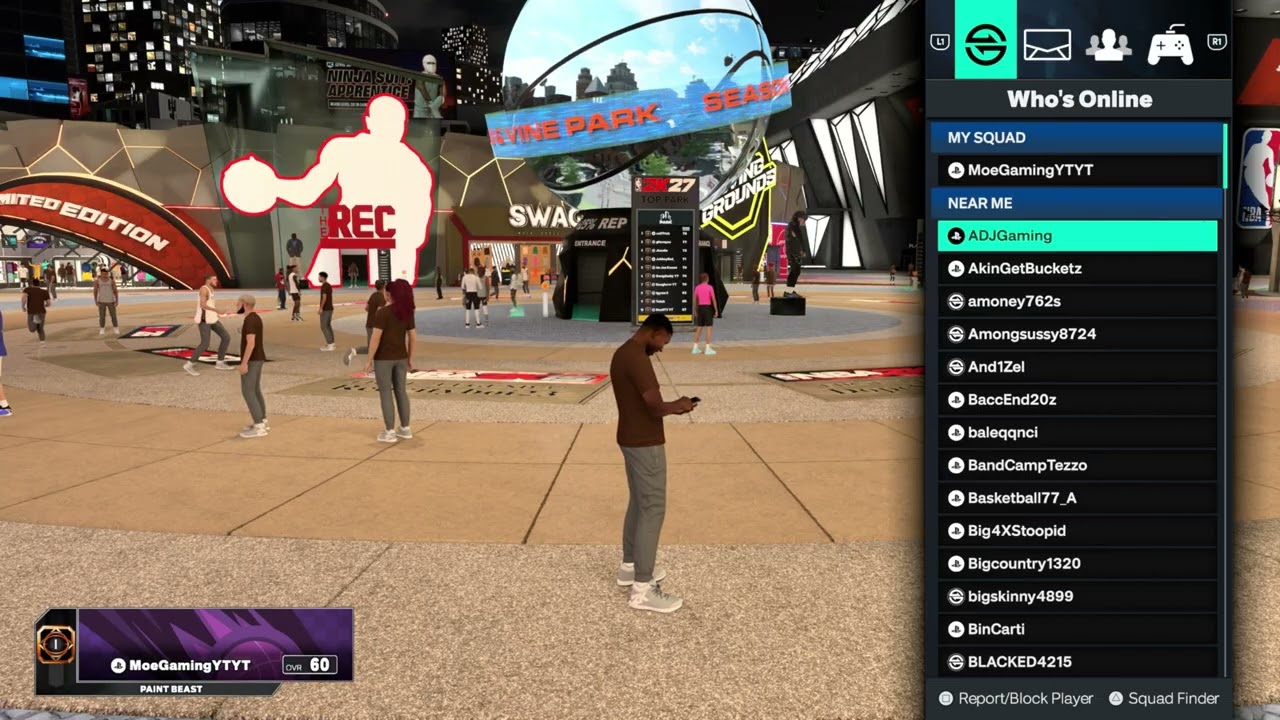
Quick answer: Enable Crossplay from the NBA 2K27 main-menu Settings on both supported consoles, then open the City Social menu with L1 + R1, add the other person as a 2K Friend, and send a squad invite. For Co-Op MyCAREER, start Fire & Concrete, reach the supported NBA portion, choose Play Game > Play Next Game, turn Co-Op on, and invite the friend. Official crossplay is limited to PS5 and Xbox Series X|S; PC and Nintendo Switch players cannot join that cross-console pool.
This guide combines the exact actions demonstrated in Moe Gaming’s source videos with current first-party support information. Menu names can move after updates, so use the current on-screen label when it differs slightly.
Before you start
- Both players need the same current NBA 2K27 update.
- Crossplay partners must be on PS5 and Xbox Series X|S.
- Online multiplayer may require the appropriate PlayStation or Xbox subscription.
- Child accounts need communications and multiplayer permissions.
1. Enable crossplay on both consoles
- Return to the NBA 2K27 main menu.
- Open the gear or Features area and choose Settings.
- Scroll to Crossplay and set it to On.
- Have the other player repeat the same change, then restart the online mode if either setting changed.
Crossplay must be enabled on both sides. A PS5–Xbox Series X|S session cannot form if either player opts out.
2. Add the person as a 2K Friend
- Load into MyCAREER and the City.
- Press L1 + R1 to open Social.
- Choose Search, or select the player from Near Me if present.
- Open the player card and choose Add 2K Friend.
- Have the recipient accept the request.
A platform friend is not always the same as a 2K Friend. The in-game relationship is the reliable bridge between supported consoles.
3. Allow friend requests and game invites
- In Social, open Options.
- Set friend requests and in-game invites to an allowed state such as Open to All or Friends Only, depending on the menu.
- Verify the same settings on the other account.
- If a child account cannot change them, review the console family and 2K account permissions.
Privacy settings can block a request even when crossplay is on and both consoles are online.
4. Invite a player to your squad
- Open Social with L1 + R1.
- Find the accepted 2K Friend through Search, friends, Near Me, or Squad Finder.
- Select the player and choose Invite to Squad.
- Wait for acceptance before entering a queue or traveling to another instance.
A squad keeps the group together for supported activities, but it does not override a full server instance or platform outage.
5. Fix “unable to join friend’s City”
- Confirm both players are 2K Friends and Crossplay remains On.
- Set in-game invites to Open to All temporarily for testing.
- Leave any current squad, return to the main menu, and load the City again.
- Send a fresh invitation after both players finish loading.
- Check 2K server status if the problem affects many players.
This clears stale invitations and mismatched City instances without changing router settings unnecessarily.
6. Enable voice chat
- Open Social with L1 + R1, then Options.
- Set Voice Chat to Open to All if you want in-game chat.
- On PS5, open Control Center > Sound and confirm Game Voice Chat is not muted.
- Check headset input/output and account communication permissions.
The in-game menu shown in the video offers Open to All or Disabled. Console-level mute and family settings can still block audio.
7. Play Co-Op MyCAREER with a friend
- Start or load the Fire & Concrete MyCAREER story.
- Progress until the game makes the NBA portion available. If your story menu offers Skip to Chapter 6, the walkthrough shows that option as a faster path; read the warning before skipping story content.
- Open the next-game screen and choose Play Game, then Play Next Game.
- Change the top-right Co-Op setting from Off to On.
- Select the invite option and choose the friend you want to join.
- Wait for the friend to accept before launching the game. In the walkthrough, the invited player controls Trey Miller.
2K officially lists Co-Op MyCAREER as part of NBA 2K27. This is different from simply joining the same City squad: both players enter the supported story game together, so complete the story prerequisite and switch Co-Op on from the game-launch screen.
If the Co-Op toggle is missing: confirm both copies are updated, load the supported Fire & Concrete chapter, verify the friend and invite settings above, and return to the next-game screen. Do not assume every MyCAREER activity supports co-op.
Why these steps work
NBA 2K27 uses several independent gates: platform support, the Crossplay toggle, the 2K Friends relationship, invite/privacy settings, current City instance, and communications permissions. Checking them in that order finds the blocked layer without random network changes.
Warnings and common mistakes
- Do not promise PC or Nintendo Switch crossplay; 2K lists crossplay only for PS5 and Xbox Series X|S.
- Voice chat may expose you to other players. Use mute, block, or report controls when needed.
- Do not share account passwords or verification codes to add a friend.
Relevant gaming gear
As an Amazon Associate I earn from qualifying purchases.
- PS5/PC-compatible wireless gaming headset — optional equipment; buy only if it fits the specific setup described above.
- Cable Matters Cat 6 Ethernet cable — optional equipment; buy only if it fits the specific setup described above.
- DualSense wireless controller — optional equipment; buy only if it fits the specific setup described above.
Watch the original Moe Gaming walkthroughs
Frequently asked questions
Can PS5 play NBA 2K27 with PC?
No. 2K’s official FAQ limits crossplay to PS5 and Xbox Series X|S.
Why can I see my friend but not invite them?
The player may not have accepted the 2K Friend request, invites may be restricted, or one side may have crossplay disabled.
Why does voice chat remain silent?
Check the in-game Voice Chat option, console game-chat mute, selected microphone and headset, and child-account communication permissions.