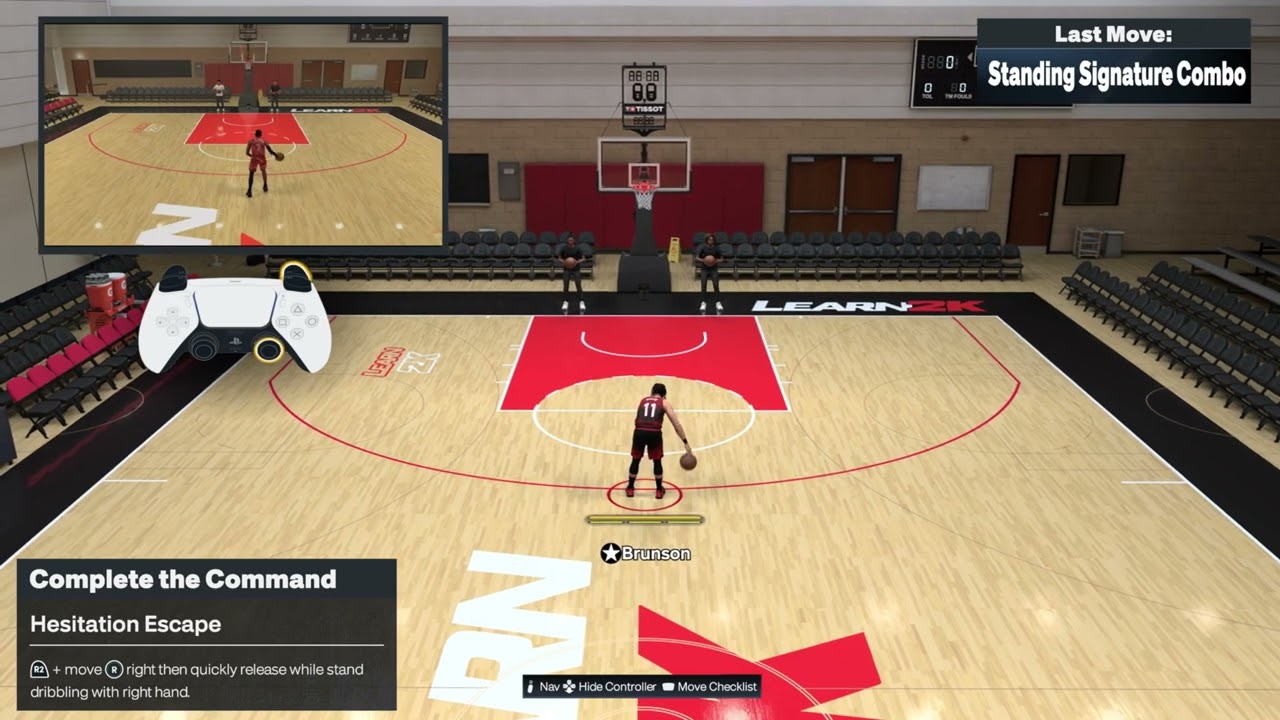
Quick answer: For the hesitation escape demonstrated on PS5, stand dribbling with the ball in your right hand, hold R2, then quickly flick the Right Stick right and release it. For a signature combo, quickly flick and release the Right Stick up twice. For the stepback crossover, hold R2, flick the Right Stick down, and release it quickly. The equipped package, ball hand, ratings and timing can change the animation, so confirm the current Learn 2K prompt before using a move online.
| Move | Default PS5 input demonstrated | Important detail |
|---|---|---|
| Hesitation escape | From a stand dribble with ball in right hand: hold R2, flick Right Stick right, release | The source clip shows the right-hand setup; follow Learn 2K for the mirrored prompt |
| Signature combo | Quickly flick and release Right Stick up twice | Your equipped signature package controls the resulting sequence |
| Stepback crossover | Hold R2, flick Right Stick down, then release quickly | Start with enough space behind the ball handler |
Before you practice
- Use the default PlayStation control preset or compare each instruction with the live Learn 2K prompt.
- Practice offline first so network delay does not hide whether the flick registered.
- Start from a controlled stand dribble and leave room for the animation.
- Check which signature size-up and combo packages your player has equipped.
- If the Right Stick or R2 responds late, work through the NBA 2K27 controller input-delay checklist before changing your timing.
1. Perform the hesitation escape
- Stop moving and begin a stand dribble with the ball in your right hand.
- Press and hold R2.
- Quickly flick the Right Stick right.
- Release the Right Stick immediately and let the escape animation start before adding another input.
- Practice the timing in Learn 2K, then add your next drive, shot or pass.
The walkthrough demonstrates this specific right-hand setup. Ball hand and the active control prompt matter; do not assume the identical direction will produce the mirrored move from the left hand. Use the current Learn 2K prompt when practicing the opposite side.
2. Trigger a signature combo
- Settle into a stand dribble with space around the ball handler.
- Quickly flick the Right Stick up and release it.
- Repeat the same up-and-release motion a second time without holding the stick.
- Let the equipped signature sequence complete before chaining another move.
The video demonstrates the two quick upward inputs. The animation is not universal: NBA 2K27 links signature moves to the packages equipped on the player, so another build can display a different combo from the same request.
3. Perform a stepback crossover
- Begin dribbling with enough room behind the ball handler.
- Press and hold R2.
- Quickly flick the Right Stick down.
- Release the Right Stick immediately and let the stepback crossover begin before adding another input.
- Read the defender, then drive, pass or shoot instead of preselecting the next action.
The source demonstration uses a short R2-plus-down request. A held or diagonal stick motion can call a different stepback or escape animation. Your equipped Stepback Crossover package determines the exact motion and distance.
Why these controls work
NBA 2K27 groups dribble inputs into named move families and then applies the player’s signature packages. The official gameplay guide specifically lists Signature Size-Up, Combo Moves and Hesitation Escape among its expanded dribbling options. A short flick requests a move; holding the stick or continuing to steer can request a different animation. Starting from a stable stand dribble makes the input easier for the game to distinguish.
Useful follow-ups and alternatives
- Use the hesitation escape to create a change of direction, then read the defender instead of committing to a shot automatically.
- Reset to a neutral stand dribble if the first input becomes a crossover or moving breakdown.
- Practice one equipped package at a time; swapping packages changes the timing and distance you must learn.
- For an on-ball scoring setup, pair the move with the NBA 2K27 shooting-controls guide.
- If a screen is safer than an isolation, use the NBA 2K27 pick-and-roll controls.
Warnings and common mistakes
- Do not hold the Right Stick after the flick; a hold can request a shot or another move.
- Do not mash several stick directions. Wait long enough to see which animation registered.
- The hesitation clip documents a right-hand setup only. Use Learn 2K for the opposite-hand direction.
- Signature packages, attributes, fatigue, defender position and patches can change the animation or result.
- Online latency can make a correct flick appear late. Learn the move offline before judging it in multiplayer.
- A new controller only helps if testing confirms stick drift or a faulty R2 input.
Frequently asked questions
Why do I get a crossover instead of a hesitation escape?
You may still be moving, the ball may be in the other hand, or the stick may be traveling diagonally. Reset to a stand dribble, confirm the ball is in the right hand for this demonstration, then make one clean rightward flick while holding R2.
Why does my signature combo look different?
The same request can call the signature package equipped on your player. Different builds and packages can therefore produce different sequences.
Should I hold the Right Stick up for the combo?
No. The source demonstration uses quick up-and-release motions. Holding the stick can request a different action.
Can I use these controls online?
Yes, but practice offline first. Connection delay changes when the move appears on screen even though your controller input happened earlier.
Are these inputs guaranteed after every update?
No. Control presets and gameplay patches can change prompts. The current in-game Learn 2K display should take priority if it differs.
Watch the Moe Gaming walkthroughs
Hesitation escape
Signature combo
Stepback crossover
Optional controller replacement
As an Amazon Associate I earn from qualifying purchases.
- DualSense wireless controller — relevant only after confirming stick drift or an unreliable R2 input; hardware will not correct move timing or package selection.