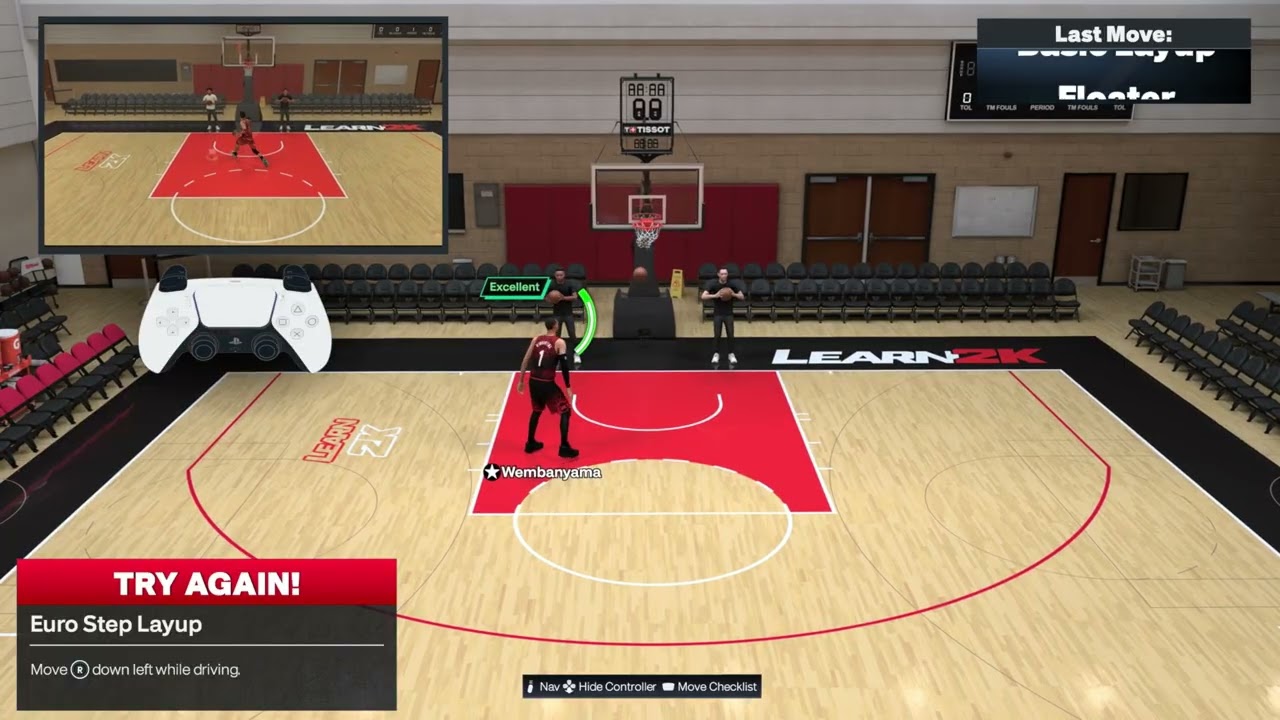
Quick answer: For a basic layup on the default PS5 layout, drive into close range and hold Square. Most advanced finishes use the Right Stick: hold it left or right for a scoop, down for a floater, or diagonally down-left/down-right for a Euro step. Hold R2 with the relevant stick direction for hop and spin gathers. For a step-through, tap Square for a pump fake, then hold Square or move and hold the Right Stick before the fake ends.
| Move | Default PS5 input | Best setup |
|---|---|---|
| Quick scoop layup | Hold Right Stick left or right | Drive at the rim and move the ball away from the defender |
| Runner / floater | Hold Right Stick down | Drive into close range with space in front |
| Reverse layup | Hold Right Stick toward the baseline side | Drive along the baseline and pass under the rim |
| Euro step | Hold Right Stick down-left or down-right; or double-tap Square | Attack a defender with room to step across |
| Slow-step decel | Start a Euro step, then hold L2 during the gather | Use the change of pace before the finish |
| Hop-step finish | Hold R2 and Right Stick down-left/down-right while driving | Hop into open space instead of directly into the defender |
| Spin gather | Hold R2 and double-tap Square; or rotate and hold Right Stick | Drive with enough space to complete the spin |
| Half-spin gather | With ball in right hand, rotate Right Stick from right toward up and hold | Use a short quarter-circle; mirror it for the other hand |
| Hop / stepback gather | Hold R2 and move Right Stick in the hop direction | Stand or drive laterally before the input |
| Step-through | Tap Square for pump fake, then hold Square or hold Right Stick in a direction | Work at close range after ending the dribble |
| Normal layup | Drive into close range and hold Square | Use the open lane when an advanced gather is unnecessary |
Basic normal layup
- Drive toward an open side of the basket.
- Enter close finishing range without running directly into a set defender.
- Press and hold Square to begin the layup.
- Use the on-screen feedback and release cue for the selected animation.
The short walkthrough demonstrates the basic Square-button finish. The animation and make still depend on approach angle, ratings, fatigue and the contest.
Pump fake before a step-through
Tap Square after ending the dribble to pump fake, then use the step-through input before the fake ends. NBA 2K27’s official gameplay guide confirms that a pump fake can lead directly into its new five-direction Pro Stick step-through system.
Before you practice
- These instructions use the default PlayStation controls shown in NBA 2K27’s Learn 2K drills.
- Practice offline first so latency does not hide whether the move registered.
- Check that your player’s layup package and finishing ratings support the animation you expect.
- If the stick feels delayed or moves trigger inconsistently, use the NBA 2K27 controller input-delay guide before changing your timing.
- Follow the live Learn 2K prompt if your custom control preset differs from this page.
1. Perform a quick scoop layup
- Begin a controlled drive toward the basket.
- As you enter finishing range, move and hold the Right Stick left or right.
- Choose the side that carries the ball away from the nearest contest.
- Keep driving through the gather and use the shot feedback to judge timing.
The scoop is about release angle, not extra speed. If you point the stick toward the defender, the game may select a more contested animation.
2. Use a runner or floater
- Drive into the lane without reaching the restricted area.
- Move and hold the Right Stick down.
- Let the player begin the runner animation and time the finish.
A floater is useful when a rim protector is waiting deeper in the paint. Starting too close can turn it into another layup animation.
3. Trigger a reverse layup
- Approach along a baseline instead of driving straight down the middle.
- Keep enough momentum to travel under or around the rim.
- Hold the Right Stick toward the baseline side. The current controls list shows Right Stick right on the right baseline.
- Mirror the setup on the other side and follow the on-screen prompt if it displays a different direction.
The baseline route matters. The same stick input from the middle of the paint may select a normal layup instead.
4. Do a Euro-step layup
- Drive toward the paint with space to take two lateral steps.
- Move and hold the Right Stick down-left or down-right, choosing the side that avoids the defender.
- As an alternative, double-tap Square while driving.
- Finish only after the gather begins; do not change directions again mid-animation.
The source demonstration needed several attempts because a diagonal input can register as straight down or sideways. Make a clean diagonal movement rather than rolling the stick slowly.
5. Add the slow-step decel
- Begin the same Euro-step input.
- While the gather is forming, press and hold L2.
- Keep the drive line open and let the player slow the gather before finishing.
The deceleration changes pace to disrupt the defender’s contest timing. It does not create automatic separation, and holding L2 too early may change your movement before the Euro begins.
6. Use the hop-step finish
- Drive toward one side of the lane.
- Hold R2.
- Move and hold the Right Stick down-left or down-right toward the open landing area.
- Complete the finish after the hop.
The associated video calls this a “Hot Step Finish,” while current control references describe the action as a hop-step layup. The input and demonstrated movement are the important parts. Do not aim the hop directly into a set defender.
7. Perform a spin gather
- Drive with the ball and leave room for the player to turn.
- Hold R2 and double-tap Square.
- Alternatively, with the ball in the right hand, rotate the Right Stick clockwise and keep holding it as the gather starts.
- Mirror the rotation when the ball is in the opposite hand.
The double-tap is usually easier to reproduce. A slow stick rotation can become a dribble move or a different finish.
8. Perform a half-spin gather
- Drive with the ball in the right hand.
- Rotate the Right Stick in a short quarter-circle from right toward up.
- Keep holding at the end of the motion to convert the move into a gather and shot.
- Mirror the arc when the ball is in the left hand.
The source narration first says “half circle” and later clarifies a smaller quarter-circle. The current controls cross-check also specifies a quarter-circle. Use a compact, deliberate arc and practice in Learn 2K until the objective registers.
9. Do a hop or stepback gather
- Start from a standstill or move laterally rather than sprinting directly at the rim.
- Hold R2.
- Move the Right Stick in the direction you want the player to hop.
- Hold the direction long enough for the gather to begin, then complete the shot.
If you are driving straight ahead, the same input can select a hop-step layup. Your approach angle helps determine the animation.
10. Finish with a step-through
- Work into close range and end the dribble.
- Tap Square for a pump fake.
- Before the fake ends, press and hold Square, or move and hold the Right Stick in the direction you want to step.
- Release according to the shot timing cue.
2K officially describes five Pro Stick directions for the new step-through up-and-under system. The direction changes the separation move, so practice more than one response instead of repeating the same side.
Why these inputs work differently in NBA 2K27
NBA 2K27 separates advanced gathers—such as Euros, hops and spins—from the finish. Its Dynamic Layup Engine then pairs the gather with a finish based on the matchup, angle, ratings and defender position. That is why the same button sequence can look different on two possessions. The goal is to request the right family of move and give the engine a clean lane, not to force one identical animation every time.
Alternatives when a move will not register
- Use the listed Square-button alternative for Euro or spin gathers.
- Switch hands before the move so the stick direction matches the ball hand.
- Slow the approach and enter the input once rather than repeatedly flicking the stick.
- Use Learn 2K until the drill confirms the input, then move to an offline scrimmage.
- Choose a normal layup when the lane is already open; an advanced gather adds risk when no defender needs to be moved.
Warnings and common mistakes
- A correct input does not guarantee a make. Ratings, stamina, contest level and release timing still matter.
- Do not hold R2 for moves that do not call for turbo; it can change the selected animation.
- Do not assume every diagonal is identical. Ball hand and drive direction affect the result.
- Online delay can make a double-tap or short stick arc register late.
- Game updates or custom presets can change prompts. Trust the current in-game Learn 2K display when it conflicts with an old guide.
Frequently asked questions
Why does my Euro step become a floater?
The Right Stick likely registered straight down instead of diagonally down-left or down-right. Use a clean diagonal input and begin it while driving.
Why does the spin gather become a dribble move?
The rotation may be too slow, the player may be outside finishing range, or the stick may have returned to neutral before the gather registered. The R2 plus double-tap Square alternative is easier to test.
Can every build perform every animation?
The input can request the move, but available packages, ratings, fatigue and defender position influence what animation and result you receive.
Does L2 make every Euro step slower?
L2 is used during the Euro gather for the slow-step decel. Timing it before the Euro begins can affect your drive instead.
Should I use the Pro Stick or Square?
The Pro Stick gives more directional control. Square alternatives can be easier for Euro and spin gathers, especially while learning.
Watch the Moe Gaming walkthroughs
Slow-step decel
Hop-step finish
Euro-step layup
Runner / floater
Half-spin gather
Spin gather
Hop / stepback gather
Step-through
Quick scoop layup
Reverse layup
Optional controller replacement
As an Amazon Associate I earn from qualifying purchases.
- DualSense wireless controller — relevant only if your current controller has confirmed stick drift or unreliable buttons; it will not fix timing, ratings or defensive reads.
Official references
- NBA 2K27 Gameplay: advanced layups, step-throughs and the Dynamic Layup Engine
- NBA 2K27 official FAQ
- NBA 2K Support
Controls cross-check: NBA 2KW PlayStation and Xbox controls table.