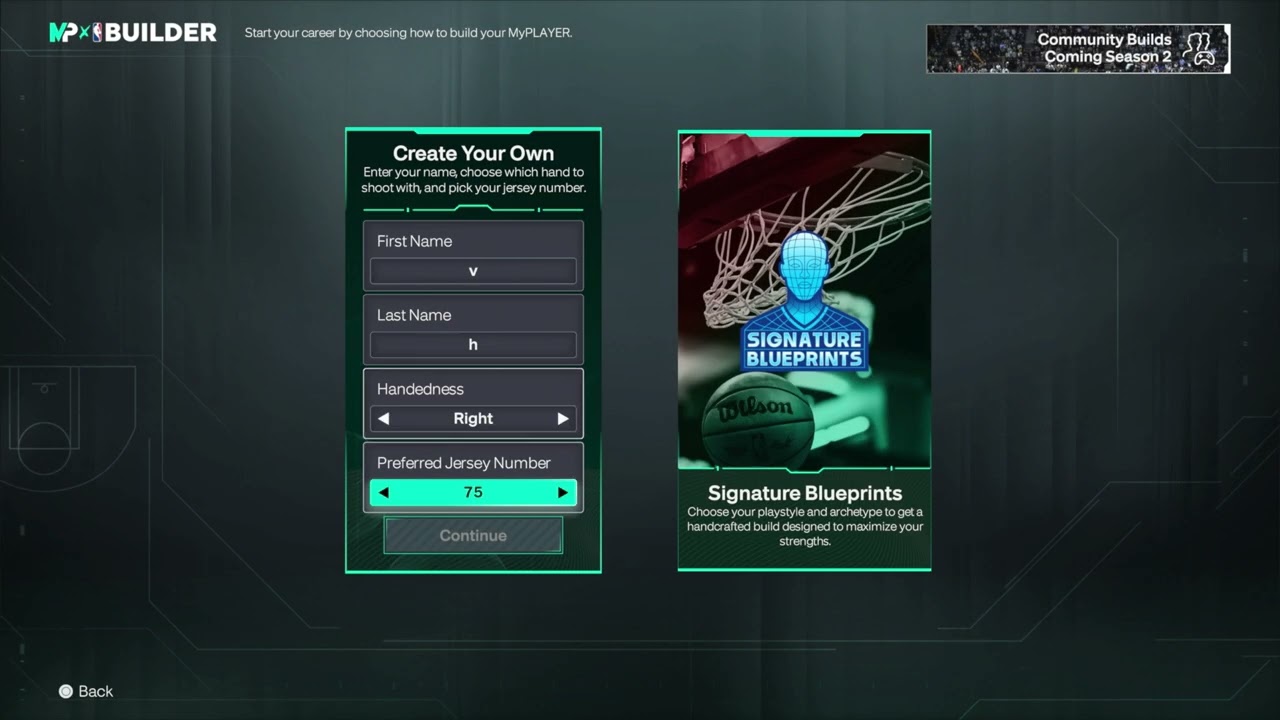
Quick answer: From the NBA 2K27 main menu, choose MyCAREER, create or select a MyPLAYER, and choose Fire & Concrete to start the story. Use Create Your Own for a custom build, or Import Build only for an NBA 2K27 build uploaded through the official NBA 2K HQ app. A finished NBA 2K26 MyPLAYER, its progress, and its VC do not transfer into NBA 2K27.
This guide combines the exact actions demonstrated in Moe Gaming’s source video with current first-party support information. Menu names can move after updates, so use the current on-screen label when it differs slightly.
Before you start
- Connect the console or PC to the internet and sign in to the correct 2K Account.
- Decide the role you want: primary ball handler, shooter, wing defender, interior defender, or another specialty.
- Do not spend VC until the build’s measurements, attribute caps, badges, and animations are confirmed.
1. Start a new MyCAREER build
- Choose MyCAREER from the main menu.
- Select a new player or build slot.
- Customize appearance if prompted, or use a signature blueprint as a starting point.
- Choose Create Your Own for a fully custom allocation.
Blueprints are faster, but a custom build gives direct control over tradeoffs. Starting the builder does not require you to commit immediately.
2. Set identity and physical measurements
- Enter the player name, handedness, jersey number, and position.
- Choose height, weight, and wingspan.
- Review how each measurement changes attribute caps before continuing.
- Select the body setting offered by the builder.
Measurements are functional choices. Taller height or longer wingspan may improve some defensive or finishing ceilings while reducing other caps.
3. Allocate attributes
- Raise the attributes needed for the intended role first.
- Watch how attribute choices change the overall potential, badges, and animation eligibility.
- Continue until the builder reaches the required 99 overall potential allocation.
- Use Options or the displayed advance prompt only after reviewing every cap.
The builder’s 99 potential represents the completed allocation ceiling, not the player’s starting in-game overall. Progression still requires gameplay or VC.
4. Review badges, takeovers, and animations
- Check which badges unlock and at what attribute threshold.
- Confirm the build meets key animation or package requirements.
- Select takeovers that reinforce the role rather than trying to cover every weakness.
- Return to attributes if a crucial threshold was missed.
A single point can sometimes change eligibility. Review thresholds before finalizing rather than rebuilding after spending currency.
5. Test the build before committing
- Choose Test Build when offered.
- Try the intended position, movement, shooting, finishing, and defense.
- Test at more than one simulated overall if the builder allows it.
- Return and revise measurements or attributes if the player feels wrong.
Testing cannot reproduce every online matchup, but it reveals movement, spacing, and control issues without spending VC.
Start the Fire & Concrete MyCAREER story
- Create or select the MyPLAYER build you want to use.
- Open MyCAREER from the main menu.
- Choose Fire & Concrete from the available MyCAREER story options.
- Read the current story description and choose Start Your Journey.
- Continue through the opening sequence and use the MyPLAYER menus to review attributes before spending VC.
2K describes Fire & Concrete as NBA 2K27’s cinematic MyCAREER story. The walkthrough shows it as the route that begins before the NBA and continues toward the professional portion of the career. Other available modes are separate choices, so select the label that exactly says Fire & Concrete.
Can an NBA 2K26 build transfer to NBA 2K27?
No—not as a finished MyPLAYER with its attributes, badges, career progress, or VC. The Import Build option shown in NBA 2K27 is for a build created and uploaded with the official NBA 2K HQ app. 2K’s current support page says the app’s full builder is available for NBA 2K27, while NBA 2K25 and NBA 2K26 app features are limited to face scan and 2KTV. 2K also states that VC cannot move between yearly releases.
- Install the official NBA 2K HQ app and select NBA 2K27.
- Sign in with the platform account linked to the NBA 2K27 copy you use.
- Create a new NBA 2K27 build in the app and upload it to the console or PC account.
- In NBA 2K27, open MyCAREER and choose Import Build when the uploaded 2K27 build appears.
- Review every measurement, attribute cap, badge, and animation before committing or spending VC.
You can manually use an old build as inspiration, but NBA 2K27’s ratings, badges, thresholds, and builder rules can produce a different result. A QR code or shared template also transfers a design recipe, not the prior game’s upgraded player or currency.
- Do not delete the NBA 2K26 save expecting it to appear in 2K27.
- Do not pay a third party to “move” a build or VC between years.
- Do not delete an NBA 2K HQ account while troubleshooting; 2K warns that account deletion can remove linked content and progress.
Why these steps work
NBA 2K27’s builder links measurements and attributes to caps, badges, takeovers, and animation eligibility. Planning the role first and testing last makes those tradeoffs visible before money or progression time is committed.
Warnings and common mistakes
- Finalizing and upgrading the wrong build can waste VC; review all thresholds first.
- Do not assume an NBA 2K26 build transfers exactly—ratings, badges, and thresholds can change by game.
- Online meta recommendations can become outdated after gameplay updates; build for a clear role you understand.
Relevant gaming gear
As an Amazon Associate I earn from qualifying purchases.
- DualSense wireless controller — optional equipment; buy only if it fits the specific setup described above.
- PlayStation controller thumbstick caps — optional equipment; buy only if it fits the specific setup described above.
Watch the original Moe Gaming walkthrough
Frequently asked questions
What does 99 potential mean?
It is the total allocation ceiling used to complete the builder. The new MyPLAYER does not necessarily begin at 99 overall.
Can I edit a build after starting MyCAREER?
Some appearance or animation choices can change, but core measurements and attribute caps generally require a new build. Test carefully before committing.
Can I create a build in the companion app?
2K documents an NBA 2K HQ app with MyPLAYER builder features. Confirm the app is official and connected to the correct account before uploading.