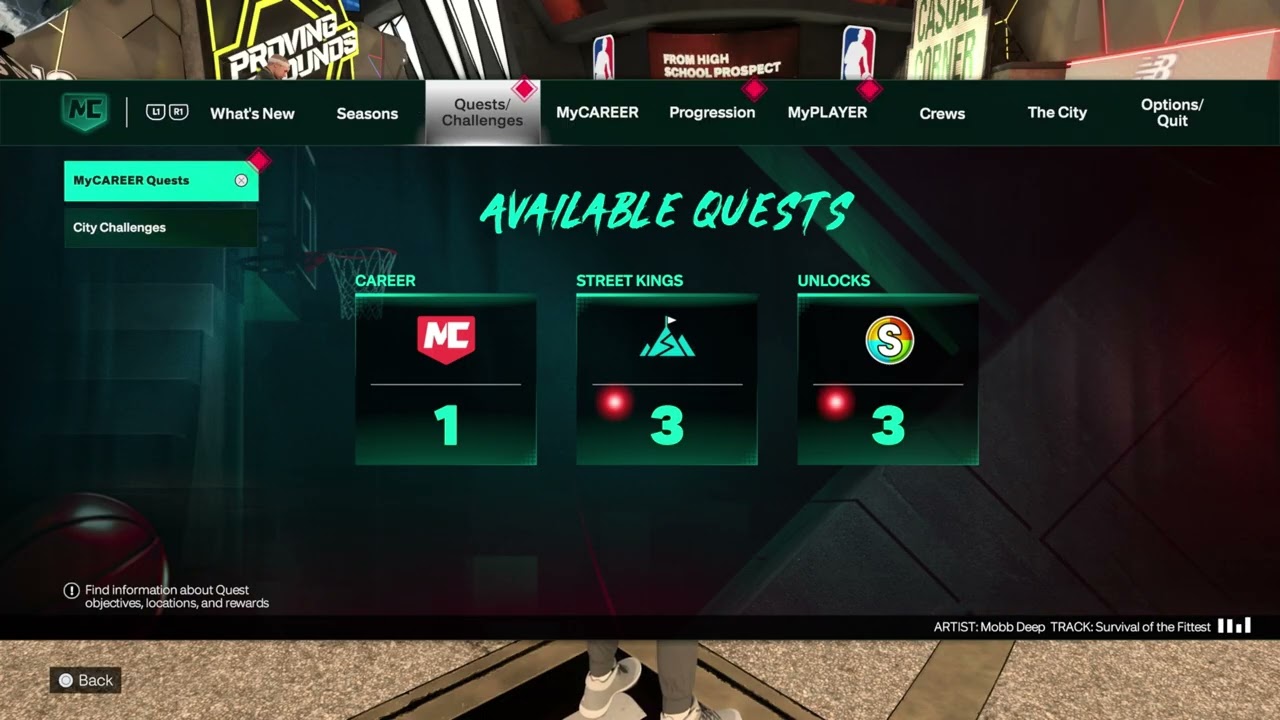
NBA 2K27 puts progression and VC opportunities in different menus, City locations, and limited-time campaigns. This guide combines six Moe Gaming walkthroughs so you can find quests, City challenges, Daily Rewards, 2KTV, Daily Pick ’Em, locker codes, and eligible Twitch Drops without treating each small feature as a separate thin article.
Before you start
- Load a MyCAREER save and enter the City. If you still need a build, use the NBA 2K27 MyCAREER build guide.
- Finish any introductory objective that blocks free movement or hides City menus.
- Connect to 2K’s online services and make sure the game has finished downloading current data.
- Treat every reward amount and timer shown in the videos as an example. The live screen in your copy of the game is authoritative.
View every MyCAREER quest
- While standing in the City, press Square to open the currently active quest quickly.
- To see the full list, press Options to open the main menu.
- Open MyCAREER Quests.
- Review the available groups shown in the walkthrough: Career, Street Kings, Unlocks, Training, and Completed.
- Open a quest and read its objective, expiry information, and reward before tracking it.
The shortcut is useful when you already know what you are doing; the full menu is better when you want to compare daily, weekly, unlock, and career objectives. 2K’s current Rebirth guidance also confirms that some unlock progress is tracked under MyCAREER quests.
View daily, weekly, starter, and lifetime challenges
- Press Triangle in the City to open the challenge panel directly.
- Review Daily Challenges first if you want time-limited objectives.
- Open Starter Challenges for early unlocks and introductory rewards.
- Check Lifetime Challenges for longer progress goals, boosts, badges, and other rewards listed by the live game.
- Review Weekly Races and their current requirements before traveling to the Track.
- Alternatively, open the main menu and go to Quests and Challenges > City Challenges.
Quests and challenges are separate lists. If an objective is missing from one screen, check the other before assuming the game failed to track it.
Claim the Daily Reward
- Open the City map and look near the Arena area shown in the source video.
- Travel to the station labeled for Daily Rewards.
- Stand at the prompt and press X.
- Wait for the reward animation and confirm the item, VC, or Rep boost shown on your screen.
- Note the next available time displayed at the station. Do not assume it resets at midnight in your time zone.
The walkthrough received a two-hour 2X Rep reward and showed another claim timer. Your result can be different, and live-service reward pools can change.
Watch 2KTV for eligible VC rewards
- Find the 2KTV screen near the Arena area on the City map.
- Open the station and choose an episode or segment that displays a VC reward.
- Watch the required content and follow any on-screen question or completion prompt.
- Confirm that the reward was credited before leaving the screen.
The video shows example segments advertising 600 VC, but the amount, eligible episodes, and completion rules are live values. Skipping content may prevent credit, so follow the current prompt rather than assuming every video pays.
Use Daily Pick ’Em
- Find the Daily Pick ’Em activity near the Arena area shown in the walkthrough.
- Open it and review the games or selections that are currently available.
- Make your pick before the activity closes.
- Return after the result is settled and follow the live claim prompt if your selection qualifies.
A matchup already marked in progress may be locked. Pick availability and VC rewards depend on the live schedule, so there may be nothing to enter at certain times.
Use official locker codes and Twitch Drops safely
- Check NBA 2K’s official site or verified NBA 2K social accounts for a current locker code or announced Drops campaign.
- Read the eligible platform, region, end time, account-linking requirement, and exact reward before starting.
- For a Twitch Drop, sign in to Twitch, watch a participating live channel for the required time, and confirm progress in Twitch’s Drops & Rewards inventory.
- Claim the Drop in Twitch when the campaign requires it, then follow 2K’s current delivery or code-redemption instructions.
- For a locker code, open NBA 2K27’s code-entry screen, type the code exactly as published, and submit it before its stated expiration.
- Confirm the reward in game before closing the screen or contacting support.
The source video shows the general watch-progress and code-entry flow, but it does not verify that a 50,000-VC or 100,000-VC code is active for every player. Twitch explains that each game publisher sets a Drop campaign’s eligibility and fulfills the in-game reward. Codes and campaigns can expire quickly, be limited by region or platform, or award different items.
- Never enter a 2K, PlayStation, Xbox, Steam, Nintendo, or Twitch password on an unofficial code page.
- A third-party code tracker is not proof that a code is active. Confirm it through 2K and the live in-game result.
- Do not buy a “locker code,” account, or VC offer from another player.
- If Twitch progress does not move, verify that the channel is participating and that the correct Twitch and 2K/platform accounts are linked.
Are 100,000-VC locker codes guaranteed?
No. A video title or old code listing is not a live guarantee. Use only a current, official announcement and read its quantity, eligibility, and deadline. If 2K does not currently advertise that reward, assume it is unavailable.
Why this workflow works
The City shortcuts expose the active quest and challenge panels quickly, while the full MyCAREER menus reveal categories that a shortcut can hide. The three City reward stations are separate activities with their own timers and eligibility rules, so checking each live screen prevents missed or incorrectly assumed rewards.
Alternatives when an activity is missing
- Return to the main menu and let NBA 2K27 finish applying any update data.
- Complete the current MyCAREER introduction or required quest, then reload the City.
- Check the NBA 2K27 City locations guide and use a waypoint instead of an older visual landmark.
- If every online feature is unavailable, check 2K server status before reinstalling anything.
Warnings
- Do not buy VC from an unofficial seller or share your account credentials to claim a reward.
- Do not promise yourself a specific Daily Reward or 2KTV payout; the examples can rotate.
- Do not delete saved data or reserved game data just because a menu is temporarily missing.
- Seasonal map presentation and activity locations can change. Use the current in-game map.
Frequently asked questions
What is the difference between a quest and a challenge?
Quests are grouped under MyCAREER categories such as Career, Street Kings, Unlocks, and Training. City challenges have their own daily, starter, lifetime, and weekly-race groupings. Check both menus when tracking progression.
Why is my Daily Reward unavailable?
The prior claim may still be on cooldown, the current MyCAREER introduction may be incomplete, or online data may not have synchronized. Read the timer at the station, return to the main menu, and check 2K’s service status if several online features fail.
Can I skip a 2KTV segment and still receive VC?
Do not assume that you can. The source video did not verify full-skip eligibility. Follow the live completion or question prompt and confirm the balance change.
Are the reward amounts guaranteed?
No. The videos document what appeared during that session. 2K can rotate challenges, reward pools, episode values, and timers.
Watch the original Moe Gaming walkthroughs
The videos below show the live menu paths and City stations used in this guide.
Optional gaming accessories
- DualSense wireless controller — a direct replacement option if an existing controller has unreliable buttons
- DualSense charging station — helps keep a second controller ready during longer MyCAREER sessions
As an Amazon Associate I earn from qualifying purchases.