Quick answer: Verify Black Ops 6 in Steam first, install Activision’s currently recommended graphics driver, close overlays and remapping or recording tools, reboot Windows, and test with all custom launch options removed. Avoid copying random DirectX flags or compatibility settings before the supported steps are exhausted.
Before you start
- Confirm the PC meets the official minimum system requirements.
- Install pending Windows updates and restart.
- Note whether the crash happens before the menu, while shaders compile, or only in a match.
- Check Activision Online Services. A service incident cannot be fixed by reinstalling.
How to fix Black Ops 6 crashing on Steam
- Restart Windows. Choose Restart, not Shut down, so the current driver and service sessions are reloaded.
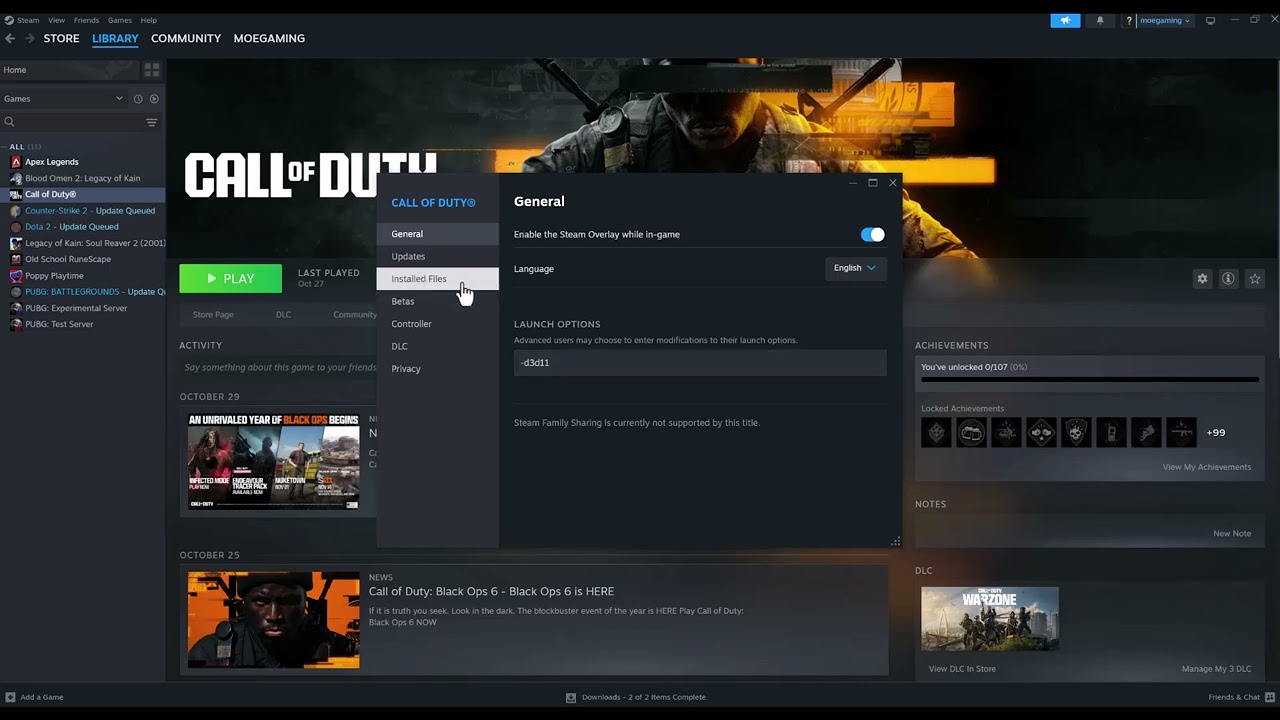
- Verify the game files. In Steam Library, right-click Call of Duty, choose Properties > Installed Files > Verify integrity of game files. Let Steam replace damaged or missing files.
- Remove custom launch options. In Properties > General, clear the Launch Options box for a clean test. The source transcript mentions a DirectX 11 flag, but that is not Activision’s general BO6 recommendation and can make diagnosis harder.
- Update the graphics driver. Use the recommended driver link on Activision’s BO6 support page rather than an unrelated beta package. Choose a clean driver installation if the vendor offers it.
- Close software conflicts. Exit input remappers, hardware monitoring overlays, capture injectors, RGB utilities, and third-party game overlays. Activision warns that remapping, overlay, and recording software may interfere with boot or gameplay.
- Disable unnecessary overlays for one test. Turn off the Steam Overlay and other overlays, then launch from Steam. Re-enable them one at a time after the game is stable.
- Let shaders finish. After an update or driver change, leave the game at the menu until shader pre-loading completes. Interrupting it can produce stutter or instability.
- Check temperatures and free storage. Keep the PC ventilated and maintain enough free space for updates and shader caches.
- Reinstall only after verification fails. Uninstall Call of Duty in Steam, restart, and install to a healthy drive. A reinstall is slower but replaces files that verification could not repair.
Why these steps work
Steam verification repairs the local package, while current drivers address graphics crashes. Removing hooks and overlays gives the game a clean process environment. Clearing custom launch options also restores the supported renderer selection instead of forcing a mode copied from an older Call of Duty release.
What not to do first
The video also shows Run as administrator, Windows compatibility mode, and a DirectX launch flag. Those can occasionally help a particular PC, but they are not universal fixes. Compatibility mode can alter permissions or Windows behavior, and an obsolete renderer flag may cause a new failure. Use them only if Activision Support asks for a specific diagnostic.
Alternatives and escalation
- Run a clean boot to identify a background conflict.
- Remove overclocks temporarily and test at default CPU, GPU, and memory settings.
- If the crash reports 0xC0000005, use our 0xC0000005 access-violation guide for targeted checks.
- Submit an official Call of Duty PC Crash Report with the requested logs.
Warnings
Do not disable antivirus or the Windows firewall permanently. Do not download replacement DLL files from third-party sites. Do not remove anti-cheat components to play online.
Frequently asked questions
Will Steam verification delete my progress?
Online progression is tied to your Activision account. Verification checks local installed files; it does not intentionally reset account progression.
Why did Steam reacquire files?
Steam found files that differed from its expected package. Restart and test after the download finishes.
Should I force DirectX 11?
Not by default. Remove custom arguments and use Activision’s supported configuration unless its support team instructs otherwise.
Official references
- Steam: Verify Integrity of Game Files
- Activision: BO6 crashes or freezes
- Activision: BO6 PC requirements
Source video
As an Amazon Associate I earn from qualifying purchases.