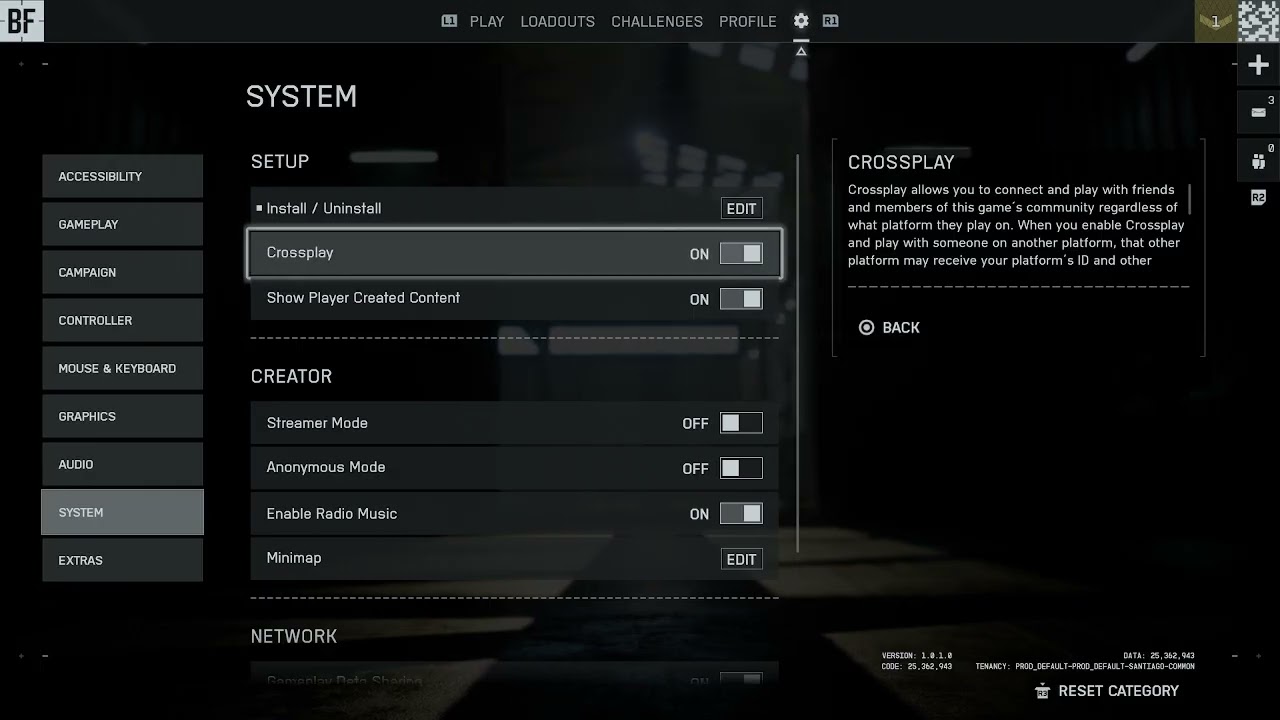
Quick answer: On Battlefield 6 for Xbox or PlayStation, open the cog icon from the main menu, choose System, then Setup, and switch Cross-play on or off. The toggle is not available on PC. You also cannot change it while in a party, on a server or actively matchmaking.
Before you start
- Leave the current party and cancel matchmaking.
- Return to the main menu rather than changing settings during a match.
- Know that disabling crossplay limits the pool to players on the same platform.
- PC players cannot disable crossplay in Battlefield 6.
Turn Battlefield 6 crossplay on or off
- Return to the main menu. Leave any active match or server and exit the party if the setting appears locked.
- Open Settings. Select the cog icon in the upper area of the Battlefield 6 main menu.
- Choose System. Open the System section, then select Setup.
- Find Cross-play. On Xbox or PlayStation, highlight the Cross-play toggle.
- Choose the behavior. Turn it On to match across supported platforms, or Off to restrict matchmaking to your own platform.
- Apply and return. Back out of the menu so the setting is saved, then begin matchmaking again.
- Re-form the party. If you are playing with friends on another platform, enable crossplay before inviting them and confirm everyone has cross-platform permissions enabled on their platform account.
Why the option can be missing or locked
EA documents the crossplay switch only for Xbox and PlayStation. It is unavailable on PC. On supported consoles, Battlefield locks the setting while you are in a party, on a server or matchmaking because changing the eligible player pool would invalidate the current session.
What changes when crossplay is off
- You will match only with players on the same platform.
- Queue times can increase, especially in less-populated regions, modes or off-peak hours.
- Friends on another platform cannot join until crossplay is enabled again.
- Turning it off does not change progression, owned content or controller settings.
If crossplay will not change
- Leave the party, server and matchmaking queue.
- Restart Battlefield 6 and return directly to System > Setup.
- Install pending game and console updates.
- Check the console’s privacy and multiplayer permissions.
- If the toggle is still absent on Xbox or PlayStation, capture the menu screen and contact EA Help with the platform and game version.
Warnings
Disabling crossplay is not an anti-cheat guarantee and does not remove every skill or input difference. On PC there is no supported switch, so do not edit configuration files or use third-party tools to force the option.
FAQ
Can PC players turn crossplay off?
No. EA’s Battlefield 6 guidance says the setting can be changed on Xbox and PlayStation only.
Why is the toggle greyed out?
Leave the party, server and matchmaking queue, then return to the main menu. The setting cannot be changed during those states.
Will disabling crossplay make matchmaking slower?
It can. The game has fewer eligible players because it searches only your platform.
Official references
Source video
As an Amazon Associate I earn from qualifying purchases.