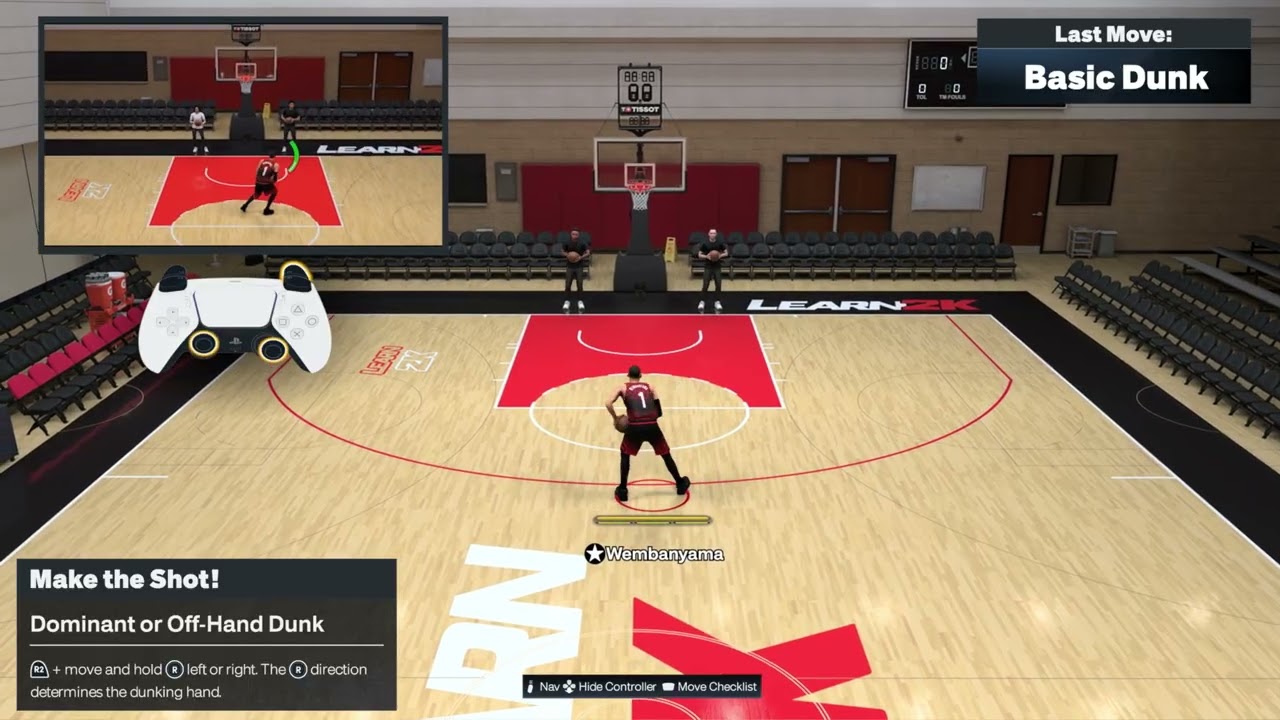
Quick answer: For a basic normal dunk on PS5, drive into close range, hold R2, then press and hold Square. Hold the Right Stick up for a two-hand dunk or left/right to choose the dunking hand. For a controllable rim hang, start a two-hand dunk and keep R2 held at the rim; use the Left Stick to swing and Right Stick up to pull up. NBA 2K27 requires manual Dunk Meter timing, so the trigger alone does not guarantee the finish.
| Action | Default PS5 input | Important detail |
|---|---|---|
| Two-hand dunk | Hold R2 + hold Right Stick up while driving in close | Time the Dunk Meter before returning the stick to neutral |
| Dominant/off-hand dunk | Hold R2 + hold Right Stick left or right in close range | The stick direction selects the dunking hand |
| Controllable rim hang | During a two-hand dunk, keep R2 held at the rim | Left Stick controls swing; Right Stick up pulls up |
| Normal dunk | Hold R2 while driving in close, then press and hold Square | The demonstrated button input requests the dunk; ratings, lane and timing still matter |
Basic normal dunk
- Build momentum toward an open lane.
- Enter close range without running directly into a set defender.
- Hold R2.
- Press and hold Square to request the normal dunk.
- Follow the current Dunk Meter and release cue shown on screen.
The walkthrough demonstrates the R2-plus-Square trigger. NBA 2K27’s official gameplay documentation adds the key limitation: all dunks use manual Dunk Meter timing, and a defender can tighten the make window during the attempt.
Before you try the dunk
- Use a player with enough driving or standing dunk ability for the situation.
- Leave a clear lane; a defender in the takeoff path can shrink the meter window or change the animation.
- Start in Learn 2K or an offline practice mode so you can see the current meter and prompt.
- Check the NBA 2K27 MyPLAYER build guide before spending VC on finishing attributes.
- If R2 or the Right Stick responds late, test the NBA 2K27 controller input-delay fixes.
1. Perform a two-hand dunk
- Build forward momentum toward an open lane.
- Enter close range without running directly into a set defender.
- Hold R2 and move and hold the Right Stick up.
- Watch the Dunk Meter and return the stick to neutral at the make window shown on screen.
The short source clip demonstrates the R2-plus-up trigger. NBA 2K’s current gameplay documentation adds a critical rule: every dunk attempt in NBA 2K27 is manually timed. Treat the button sequence as the start of the dunk, not the whole finish.
2. Choose the dominant or off hand
- Drive into close range with the ball protected.
- Hold R2.
- Move and hold the Right Stick left or right.
- Use the direction that places the ball farther from the nearest defender.
- Complete the Dunk Meter timing shown on screen.
The stick direction determines which hand the player attempts to use. It does not guarantee that exact animation if the lane, ratings or defender force a different outcome.
3. Turn a two-hand dunk into a controllable rim hang
- Start a two-hand dunk with R2 + Right Stick up.
- When the player reaches the rim, keep R2 held.
- Use the Left Stick to control the swing.
- Move the Right Stick up if you want the player to pull up on the rim.
- Release and drop safely rather than holding the animation longer than needed.
Use the two-hand setup for this move. Current controls specify a two-handed dunk as the entry into a controllable rim hang.
Why the dunk input can succeed but the shot can miss
NBA 2K27’s Dunk Meter evaluates the defense throughout the attempt, from takeoff through the finish. An open lane produces a wider timing window; a late helper or strong rim protector can tighten it in mid-air. Player ratings, fatigue, takeoff angle and badges also matter. The input requests the dunk type, while the meter and live context determine the result.
Alternatives when the lane is not open
- Use a quick scoop or Euro step from the NBA 2K27 layup and gather guide.
- Pull the ball out and call a screen instead of forcing a contact attempt; see the screens and pick-and-roll controls.
- Pass to the corner when help defense rotates early.
- Use Learn 2K to practice meter timing with one player before switching builds.
Warnings and common mistakes
- Do not stop at the trigger input; NBA 2K27 requires manual Dunk Meter timing.
- Do not assume Right Stick left always means dominant hand. It selects a side, and ball hand plus player orientation matter.
- Do not force a rim hang in traffic or when you only need the basket.
- Online latency can shift the apparent timing window. Practice in the mode you actually play.
- Control presets and patches can change prompts. Follow the current Learn 2K display if it differs.
Frequently asked questions
Why am I getting a layup instead of a dunk?
The player may be too far away, too tired, below the needed dunk rating, blocked by a defender, or using a drive angle that does not support the requested animation.
Why does a correctly triggered dunk still miss?
The Dunk Meter still needs to be timed, and its window can tighten as a defender contests the attempt.
Can I choose which hand dunks?
Yes. Hold R2 and move the Right Stick left or right in close range. The direction selects the attempted dunking side.
Why will the rim hang not start?
Begin with a two-hand dunk and keep R2 held as the player reaches the rim. Releasing R2 early ends the setup.
Does a better controller make the meter easier?
Only if your current R2 or Right Stick is faulty. It will not widen the meter or replace good takeoff selection and timing.
Watch the Moe Gaming walkthroughs
Controllable rim hang
Dominant or off-hand dunk
Two-hand dunk
Optional controller replacement
As an Amazon Associate I earn from qualifying purchases.
- DualSense wireless controller — relevant only if testing confirms a faulty R2 trigger or Right Stick; it will not improve ratings or meter timing.
Official references
- NBA 2K27 Gameplay: logic-driven Dunk Meter and finishing systems
- NBA 2K27 official FAQ
- NBA 2K Support
Controls cross-check: NBA 2KW PlayStation and Xbox controls table.